> ## Documentation Index
> Fetch the complete documentation index at: https://auth0.generaltranslation.app/llms.txt
> Use this file to discover all available pages before exploring further.

> Learn how you can empower your users to manage their own account information with the My Account API.

# My Account API

export const AuthCodeGroup = ({children, dropdown}) => {
  const [processedChildren, setProcessedChildren] = useState(children);
  useEffect(() => {
    let unsubscribe = null;
    function init() {
      unsubscribe = window.autorun(() => {
        const processChildren = node => {
          if (typeof node === "string") {
            let processedNode = node;
            for (const [key, value] of window.rootStore.variableStore.values.entries()) {
              processedNode = processedNode.replace(new RegExp(key, "g"), value);
            }
            return processedNode;
          } else if (Array.isArray(node)) {
            return node.map(processChildren);
          } else if (node && node.props && node.props.children) {
            return {
              ...node,
              props: {
                ...node.props,
                children: processChildren(node.props.children)
              }
            };
          }
          return node;
        };
        setProcessedChildren(processChildren(children));
      });
    }
    if (window.rootStore) {
      init();
    } else {
      window.addEventListener("adu:storeReady", init);
    }
    return () => {
      window.removeEventListener("adu:storeReady", init);
      unsubscribe?.();
    };
  }, [children]);
  return <CodeGroup dropdown={dropdown}>{processedChildren}</CodeGroup>;
};

export const AuthCodeBlock = ({filename, icon, language, highlight, children}) => {
  const [processedChildren, setProcessedChildren] = useState(children);
  useEffect(() => {
    let unsubscribe = null;
    function init() {
      unsubscribe = window.autorun(() => {
        let processedChildren = children;
        for (const [key, value] of window.rootStore.variableStore.values.entries()) {
          processedChildren = processedChildren.replace(new RegExp(key, "g"), value);
        }
        setProcessedChildren(processedChildren);
      });
    }
    if (window.rootStore) {
      init();
    } else {
      window.addEventListener("adu:storeReady", init);
    }
    return () => {
      window.removeEventListener("adu:storeReady", init);
      unsubscribe?.();
    };
  }, [children]);
  return <CodeBlock filename={filename} icon={icon} language={language} lines highlight={highlight}>
      {processedChildren}
    </CodeBlock>;
};

<Warning>
  The My Account API is available in Limited Early Access. To request access, contact your Auth0 account manager. To learn more about Auth0's product release cycle, read [Product Release Stages](/docs/troubleshoot/product-lifecycle/product-release-stages).
</Warning>

The Auth0 My Account API provides a dedicated set of endpoints for users to manage their own account information. Customers can use these APIs to build self-service experiences in their applications or progressively add details to a user account.

The My Account API operates within the context of the currently logged-in user and can be used directly within user-facing applications.

<Callout icon="file-lines" color="#0EA5E9" iconType="regular">
  **Using Auth0 domain vs. custom domain**

  The My Account API supports using your canonical Auth0 domain or your custom domain, but you must use the same one throughout the entire process, including:

  * Getting an access token
  * Setting the `audience` value
  * Calling the My Account API endpoint

  For more information, read [Custom Domains](/docs/customize/custom-domains).
</Callout>

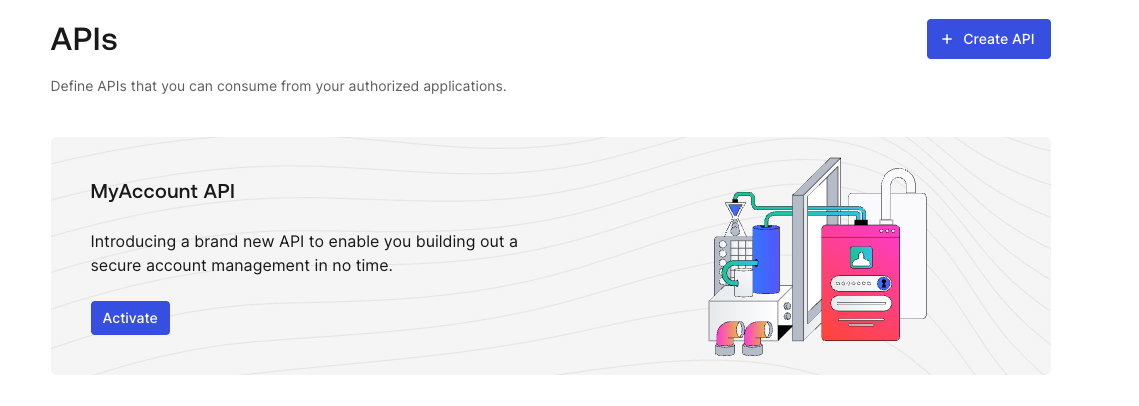
## Activate the My Account API

You can activate the My Account API for your tenant in the <Tooltip tip="Auth0 Dashboard: Auth0's main product to configure your services." cta="View Glossary" href="/docs/glossary?term=Auth0+Dashboard">Auth0 Dashboard</Tooltip>:

1. Navigate to **Applications > APIs**.
2. Locate the **MyAccount API** banner.
3. Select **Activate**.

<Frame>
  <img src="https://mintcdn.com/generaltranslationinc/PZqXjqHIg9BH1QX1/docs/images/cdy7uua7fh8z/DGkDQNIHcegN8vtQyEvF3/a2e98b06867701a66fa1f1b3df1c996b/My_Account_API_-_Activate.png?fit=max&auto=format&n=PZqXjqHIg9BH1QX1&q=85&s=e2a4c520855f2e546bfb39ef343814a7" alt="" width="1139" height="406" data-path="docs/images/cdy7uua7fh8z/DGkDQNIHcegN8vtQyEvF3/a2e98b06867701a66fa1f1b3df1c996b/My_Account_API_-_Activate.png" />
</Frame>

By default, the My Account API is created with the following application API access policies:

* `require_client_grant` for user flows
* `deny_all` for client (machine-to-machine) flows

For an application to access the My Account API on the user's behalf, you must explicitly create a client grant for that application, which allows you to define the maximum scopes the application can request. Alternatively, you can change the policy for user access flows to `allow_all`, which allows any application in your tenant to request any scope from the My Account API.

Auth0 does not recommend using `allow_all` for user access flows because the My Account API exposes sensitive information and operations. You should follow a least privilege principle with My Account API to ensure applications only get access to what they truly need, minimizing potential security risks.

The final permissions granted to the application will be determined by the intersection of the scopes allowed by the application API access policy, the Role-Based Access Control (RBAC) permissions assigned to the end user, and any user consent given (if applicable).

<Callout icon="file-lines" color="#0EA5E9" iconType="regular">
  You cannot update the application API policy for client access to the My Account API, which means you cannot access the My Account API using the Client Credentials Flow.
</Callout>

To learn more about how to manage application API access policies and their associated client grants, read [Application Access to APIs: Client Grants](/docs/get-started/applications/application-access-to-apis-client-grants).

## Get an access token

You can get an <Tooltip tip="Access Token: Authorization credential, in the form of an opaque string or JWT, used to access an API." cta="View Glossary" href="/docs/glossary?term=access+token">access token</Tooltip> for the My Account API in the same way you’d get an access token for one of your own APIs.

<Callout icon="file-lines" color="#0EA5E9" iconType="regular">
  If you’re going to allow the My Account API to perform sensitive operations (such as enrolling an authentication method), we strongly recommend that you use [step-up authentication](/docs/secure/multi-factor-authentication/step-up-authentication) to enforce additional security policies through [multi-factor authentication (MFA)](/docs/secure/multi-factor-authentication).
</Callout>

If you’re using <Tooltip tip="Universal Login: Your application redirects to Universal Login, hosted on Auth0's Authorization Server, to verify a user's identity." cta="View Glossary" href="/docs/glossary?term=Universal+Login">Universal Login</Tooltip>, read the following articles:

* [Call Your API Using the Authorization Code Flow](/docs/get-started/authentication-and-authorization-flow/authorization-code-flow/call-your-api-using-the-authorization-code-flow)
* [Call Your API Using the Authorization Code Flow with PKCE](/docs/get-started/authentication-and-authorization-flow/authorization-code-flow-with-pkce/call-your-api-using-the-authorization-code-flow-with-pkce)

If you’re using embedded login, read the following articles:

* [Call Your API Using Resource Owner Password Flow](/docs/get-started/authentication-and-authorization-flow/resource-owner-password-flow/call-your-api-using-resource-owner-password-flow)
* [Login Flow with Native Passkeys API](/docs/native-passkeys-api#login-flow)

### Audience

The <Tooltip tip="Audience: Unique identifier of the audience for an issued token. Named aud in a token, its value contains the ID of either an application (Client ID) for an ID Token or an API (API Identifier) for an Access Token." cta="View Glossary" href="/docs/glossary?term=audience">audience</Tooltip> of the My Account API is `https://{yourDomain}/me/`.

### Scope

The My Account API supports the following scopes:

<table class="table">
  <thead>
    <tr>
      <th><strong>Scope</strong></th>
      <th><strong>Description</strong></th>
    </tr>
  </thead>

  <tbody>
    <tr>
      <td><code>create:me:authentication\_methods</code></td>
      <td>Allows the user to enroll a new authentication method.</td>
    </tr>

    <tr>
      <td><code>read:me:authentication\_methods</code></td>
      <td>Allows the user to view existing authentication methods.</td>
    </tr>

    <tr>
      <td><code>update:me:authentication\_methods</code></td>
      <td>Allows the user to modify existing authentication methods.</td>
    </tr>

    <tr>
      <td><code>delete:me:authentication\_methods</code></td>
      <td>Allows the user to modify existing authentication methods.</td>
    </tr>

    <tr>
      <td><code>read:me:factors</code></td>
      <td>Allows the user to view the factors they can enroll.</td>
    </tr>
  </tbody>
</table>

For [Connected Accounts with Token Vault](/docs/secure/tokens/connected-accounts-for-token-vault), the My Account API supports the following scopes:

<table class="table">
  <thead>
    <tr>
      <th><strong>Scope</strong></th>
      <th><strong>Description</strong></th>
    </tr>
  </thead>

  <tbody>
    <tr>
      <td><code>create:me:connected\_accounts</code></td>
      <td>Allows the user to connect a new account to their user profile.</td>
    </tr>

    <tr>
      <td><code>read:me:connected\_accounts</code></td>
      <td>Allows the user to view the existing connected accounts linked to their user profile.</td>
    </tr>

    <tr>
      <td><code>delete:me:connected\_accounts</code></td>
      <td>Allows the user to delete a connected account from their user profile.</td>
    </tr>
  </tbody>
</table>

### Examples

#### Universal Login with authorization code flow

##### Step 1: Request authorization code

<AuthCodeGroup>
  ```bash cURL theme={null}
  curl --request GET \
    --url 'https://{yourDomain}/authorize?response_type=code&client_id={yourClientId}&redirect_uri=%7ByourRedirectUri%7D&scope=create%3Ame%3Aauthentication_methods&offline_access=&audience=https%3A%2F%2F{yourDomain}%2Fme%2F'
  ```

  ```csharp C# theme={null}
  var client = new RestClient("https://{yourDomain}/authorize?response_type=code&client_id={yourClientId}&redirect_uri=%7ByourRedirectUri%7D&scope=create%3Ame%3Aauthentication_methods&offline_access=&audience=https%3A%2F%2F{yourDomain}%2Fme%2F");
  var request = new RestRequest(Method.GET);
  IRestResponse response = client.Execute(request);
  ```

  ```go Go theme={null}
  package main

  import (
  	"fmt"
  	"net/http"
  	"io/ioutil"
  )

  func main() {

  	url := "https://{yourDomain}/authorize?response_type=code&client_id={yourClientId}&redirect_uri=%7ByourRedirectUri%7D&scope=create%3Ame%3Aauthentication_methods&offline_access=&audience=https%3A%2F%2F{yourDomain}%2Fme%2F"

  	req, _ := http.NewRequest("GET", url, nil)

  	res, _ := http.DefaultClient.Do(req)

  	defer res.Body.Close()
  	body, _ := ioutil.ReadAll(res.Body)

  	fmt.Println(res)
  	fmt.Println(string(body))

  }
  ```

  ```java Java theme={null}
  HttpResponse<String> response = Unirest.get("https://{yourDomain}/authorize?response_type=code&client_id={yourClientId}&redirect_uri=%7ByourRedirectUri%7D&scope=create%3Ame%3Aauthentication_methods&offline_access=&audience=https%3A%2F%2F{yourDomain}%2Fme%2F")
    .asString();
  ```

  ```javascript Node.JS theme={null}
  var axios = require("axios").default;

  var options = {
    method: 'GET',
    url: 'https://{yourDomain}/authorize',
    params: {
      response_type: 'code',
      client_id: '{yourClientId}',
      redirect_uri: '{yourRedirectUri}',
      scope: 'create:me:authentication_methods',
      offline_access: '',
      audience: 'https://{yourDomain}/me/'
    }
  };

  axios.request(options).then(function (response) {
    console.log(response.data);
  }).catch(function (error) {
    console.error(error);
  });
  ```

  ```objc Obj-C theme={null}
  #import <Foundation/Foundation.h>

  NSMutableURLRequest *request = [NSMutableURLRequest requestWithURL:[NSURL URLWithString:@"https://{yourDomain}/authorize?response_type=code&client_id={yourClientId}&redirect_uri=%7ByourRedirectUri%7D&scope=create%3Ame%3Aauthentication_methods&offline_access=&audience=https%3A%2F%2F{yourDomain}%2Fme%2F"]
                                                         cachePolicy:NSURLRequestUseProtocolCachePolicy
                                                     timeoutInterval:10.0];
  [request setHTTPMethod:@"GET"];

  NSURLSession *session = [NSURLSession sharedSession];
  NSURLSessionDataTask *dataTask = [session dataTaskWithRequest:request
                                              completionHandler:^(NSData *data, NSURLResponse *response, NSError *error) {
                                                  if (error) {
                                                      NSLog(@"%@", error);
                                                  } else {
                                                      NSHTTPURLResponse *httpResponse = (NSHTTPURLResponse *) response;
                                                      NSLog(@"%@", httpResponse);
                                                  }
                                              }];
  [dataTask resume];
  ```

  ```php PHP theme={null}
  $curl = curl_init();

  curl_setopt_array($curl, [
    CURLOPT_URL => "https://{yourDomain}/authorize?response_type=code&client_id={yourClientId}&redirect_uri=%7ByourRedirectUri%7D&scope=create%3Ame%3Aauthentication_methods&offline_access=&audience=https%3A%2F%2F{yourDomain}%2Fme%2F",
    CURLOPT_RETURNTRANSFER => true,
    CURLOPT_ENCODING => "",
    CURLOPT_MAXREDIRS => 10,
    CURLOPT_TIMEOUT => 30,
    CURLOPT_HTTP_VERSION => CURL_HTTP_VERSION_1_1,
    CURLOPT_CUSTOMREQUEST => "GET",
  ]);

  $response = curl_exec($curl);
  $err = curl_error($curl);

  curl_close($curl);

  if ($err) {
    echo "cURL Error #:" . $err;
  } else {
    echo $response;
  }
  ```

  ```python Python theme={null}
  import http.client

  conn = http.client.HTTPSConnection("")

  conn.request("GET", "/{yourDomain}/authorize?response_type=code&client_id={yourClientId}&redirect_uri=%7ByourRedirectUri%7D&scope=create%3Ame%3Aauthentication_methods&offline_access=&audience=https%3A%2F%2F{yourDomain}%2Fme%2F")

  res = conn.getresponse()
  data = res.read()

  print(data.decode("utf-8"))
  ```

  ```ruby Ruby theme={null}
  require 'uri'
  require 'net/http'
  require 'openssl'

  url = URI("https://{yourDomain}/authorize?response_type=code&client_id={yourClientId}&redirect_uri=%7ByourRedirectUri%7D&scope=create%3Ame%3Aauthentication_methods&offline_access=&audience=https%3A%2F%2F{yourDomain}%2Fme%2F")

  http = Net::HTTP.new(url.host, url.port)
  http.use_ssl = true
  http.verify_mode = OpenSSL::SSL::VERIFY_NONE

  request = Net::HTTP::Get.new(url)

  response = http.request(request)
  puts response.read_body
  ```

  ```swift Swift theme={null}
  import Foundation

  let request = NSMutableURLRequest(url: NSURL(string: "https://{yourDomain}/authorize?response_type=code&client_id={yourClientId}&redirect_uri=%7ByourRedirectUri%7D&scope=create%3Ame%3Aauthentication_methods&offline_access=&audience=https%3A%2F%2F{yourDomain}%2Fme%2F")! as URL,
                                          cachePolicy: .useProtocolCachePolicy,
                                      timeoutInterval: 10.0)
  request.httpMethod = "GET"

  let session = URLSession.shared
  let dataTask = session.dataTask(with: request as URLRequest, completionHandler: { (data, response, error) -> Void in
    if (error != nil) {
      print(error)
    } else {
      let httpResponse = response as? HTTPURLResponse
      print(httpResponse)
    }
  })

  dataTask.resume()
  ```
</AuthCodeGroup>

##### Step 2: Exchange code for access token

<AuthCodeGroup>
  ```bash cURL theme={null}
  curl --request POST \
    --url 'https://{yourDomain}/oauth/token' \
    --header 'content-type: application/json' \
    --data '{"grant_type": "authorization_code","client_id": "{yourClientId}","client_secret": "{yourClientId}","code": "{yourAuthorizationCode}","redirect_uri": "{yourRedirectUri}","audience": "{yourAudience}","scope": "create:me:authentication_methods","offline_access": ""}'
  ```

  ```csharp C# theme={null}
  var client = new RestClient("https://{yourDomain}/oauth/token");
  var request = new RestRequest(Method.POST);
  request.AddHeader("content-type", "application/json");
  request.AddParameter("application/json", "{"grant_type": "authorization_code","client_id": "{yourClientId}","client_secret": "{yourClientId}","code": "{yourAuthorizationCode}","redirect_uri": "{yourRedirectUri}","audience": "{yourAudience}","scope": "create:me:authentication_methods","offline_access": ""}", ParameterType.RequestBody);
  IRestResponse response = client.Execute(request);
  ```

  ```go Go theme={null}
  package main

  import (
  	"fmt"
  	"strings"
  	"net/http"
  	"io/ioutil"
  )

  func main() {

  	url := "https://{yourDomain}/oauth/token"

  	payload := strings.NewReader("{"grant_type": "authorization_code","client_id": "{yourClientId}","client_secret": "{yourClientId}","code": "{yourAuthorizationCode}","redirect_uri": "{yourRedirectUri}","audience": "{yourAudience}","scope": "create:me:authentication_methods","offline_access": ""}")

  	req, _ := http.NewRequest("POST", url, payload)

  	req.Header.Add("content-type", "application/json")

  	res, _ := http.DefaultClient.Do(req)

  	defer res.Body.Close()
  	body, _ := ioutil.ReadAll(res.Body)

  	fmt.Println(res)
  	fmt.Println(string(body))

  }
  ```

  ```java Java theme={null}
  HttpResponse<String> response = Unirest.post("https://{yourDomain}/oauth/token")
    .header("content-type", "application/json")
    .body("{"grant_type": "authorization_code","client_id": "{yourClientId}","client_secret": "{yourClientId}","code": "{yourAuthorizationCode}","redirect_uri": "{yourRedirectUri}","audience": "{yourAudience}","scope": "create:me:authentication_methods","offline_access": ""}")
    .asString();
  ```

  ```javascript Node.JS theme={null}
  var axios = require("axios").default;

  var options = {
    method: 'POST',
    url: 'https://{yourDomain}/oauth/token',
    headers: {'content-type': 'application/json'},
    data: {
      grant_type: 'authorization_code',
      client_id: '{yourClientId}',
      client_secret: '{yourClientId}',
      code: '{yourAuthorizationCode}',
      redirect_uri: '{yourRedirectUri}',
      audience: '{yourAudience}',
      scope: 'create:me:authentication_methods',
      offline_access: ''
    }
  };

  axios.request(options).then(function (response) {
    console.log(response.data);
  }).catch(function (error) {
    console.error(error);
  });
  ```

  ```objc Obj-C theme={null}
  #import <Foundation/Foundation.h>

  NSDictionary *headers = @{ @"content-type": @"application/json" };
  NSDictionary *parameters = @{ @"grant_type": @"authorization_code",
                                @"client_id": @"{yourClientId}",
                                @"client_secret": @"{yourClientId}",
                                @"code": @"{yourAuthorizationCode}",
                                @"redirect_uri": @"{yourRedirectUri}",
                                @"audience": @"{yourAudience}",
                                @"scope": @"create:me:authentication_methods",
                                @"offline_access": @"" };

  NSData *postData = [NSJSONSerialization dataWithJSONObject:parameters options:0 error:nil];

  NSMutableURLRequest *request = [NSMutableURLRequest requestWithURL:[NSURL URLWithString:@"https://{yourDomain}/oauth/token"]
                                                         cachePolicy:NSURLRequestUseProtocolCachePolicy
                                                     timeoutInterval:10.0];
  [request setHTTPMethod:@"POST"];
  [request setAllHTTPHeaderFields:headers];
  [request setHTTPBody:postData];

  NSURLSession *session = [NSURLSession sharedSession];
  NSURLSessionDataTask *dataTask = [session dataTaskWithRequest:request
                                              completionHandler:^(NSData *data, NSURLResponse *response, NSError *error) {
                                                  if (error) {
                                                      NSLog(@"%@", error);
                                                  } else {
                                                      NSHTTPURLResponse *httpResponse = (NSHTTPURLResponse *) response;
                                                      NSLog(@"%@", httpResponse);
                                                  }
                                              }];
  [dataTask resume];
  ```

  ```php PHP theme={null}
  $curl = curl_init();

  curl_setopt_array($curl, [
    CURLOPT_URL => "https://{yourDomain}/oauth/token",
    CURLOPT_RETURNTRANSFER => true,
    CURLOPT_ENCODING => "",
    CURLOPT_MAXREDIRS => 10,
    CURLOPT_TIMEOUT => 30,
    CURLOPT_HTTP_VERSION => CURL_HTTP_VERSION_1_1,
    CURLOPT_CUSTOMREQUEST => "POST",
    CURLOPT_POSTFIELDS => "{"grant_type": "authorization_code","client_id": "{yourClientId}","client_secret": "{yourClientId}","code": "{yourAuthorizationCode}","redirect_uri": "{yourRedirectUri}","audience": "{yourAudience}","scope": "create:me:authentication_methods","offline_access": ""}",
    CURLOPT_HTTPHEADER => [
      "content-type: application/json"
    ],
  ]);

  $response = curl_exec($curl);
  $err = curl_error($curl);

  curl_close($curl);

  if ($err) {
    echo "cURL Error #:" . $err;
  } else {
    echo $response;
  }
  ```

  ```python Python theme={null}
  import http.client

  conn = http.client.HTTPSConnection("")

  payload = "{"grant_type": "authorization_code","client_id": "{yourClientId}","client_secret": "{yourClientId}","code": "{yourAuthorizationCode}","redirect_uri": "{yourRedirectUri}","audience": "{yourAudience}","scope": "create:me:authentication_methods","offline_access": ""}"

  headers = { 'content-type': "application/json" }

  conn.request("POST", "/{yourDomain}/oauth/token", payload, headers)

  res = conn.getresponse()
  data = res.read()

  print(data.decode("utf-8"))
  ```

  ```ruby Ruby theme={null}
  require 'uri'
  require 'net/http'
  require 'openssl'

  url = URI("https://{yourDomain}/oauth/token")

  http = Net::HTTP.new(url.host, url.port)
  http.use_ssl = true
  http.verify_mode = OpenSSL::SSL::VERIFY_NONE

  request = Net::HTTP::Post.new(url)
  request["content-type"] = 'application/json'
  request.body = "{"grant_type": "authorization_code","client_id": "{yourClientId}","client_secret": "{yourClientId}","code": "{yourAuthorizationCode}","redirect_uri": "{yourRedirectUri}","audience": "{yourAudience}","scope": "create:me:authentication_methods","offline_access": ""}"

  response = http.request(request)
  puts response.read_body
  ```

  ```swift Swift theme={null}
  import Foundation

  let headers = ["content-type": "application/json"]
  let parameters = [
    "grant_type": "authorization_code",
    "client_id": "{yourClientId}",
    "client_secret": "{yourClientId}",
    "code": "{yourAuthorizationCode}",
    "redirect_uri": "{yourRedirectUri}",
    "audience": "{yourAudience}",
    "scope": "create:me:authentication_methods",
    "offline_access": ""
  ] as [String : Any]

  let postData = JSONSerialization.data(withJSONObject: parameters, options: [])

  let request = NSMutableURLRequest(url: NSURL(string: "https://{yourDomain}/oauth/token")! as URL,
                                          cachePolicy: .useProtocolCachePolicy,
                                      timeoutInterval: 10.0)
  request.httpMethod = "POST"
  request.allHTTPHeaderFields = headers
  request.httpBody = postData as Data

  let session = URLSession.shared
  let dataTask = session.dataTask(with: request as URLRequest, completionHandler: { (data, response, error) -> Void in
    if (error != nil) {
      print(error)
    } else {
      let httpResponse = response as? HTTPURLResponse
      print(httpResponse)
    }
  })

  dataTask.resume()
  ```
</AuthCodeGroup>

#### Embedded login with native passkeys

##### Step 1: Request login challenge

<AuthCodeGroup>
  ```bash cURL theme={null}
  curl --request POST \
    --url 'https://{yourDomain}/passkey/challenge' \
    --header 'content-type: application/json' \
    --data '{"client_id": "{yourDomain}"}'
  ```

  ```csharp C# theme={null}
  var client = new RestClient("https://{yourDomain}/passkey/challenge");
  var request = new RestRequest(Method.POST);
  request.AddHeader("content-type", "application/json");
  request.AddParameter("application/json", "{"client_id": "{yourDomain}"}", ParameterType.RequestBody);
  IRestResponse response = client.Execute(request);
  ```

  ```go Go theme={null}
  package main

  import (
  	"fmt"
  	"strings"
  	"net/http"
  	"io/ioutil"
  )

  func main() {

  	url := "https://{yourDomain}/passkey/challenge"

  	payload := strings.NewReader("{"client_id": "{yourDomain}"}")

  	req, _ := http.NewRequest("POST", url, payload)

  	req.Header.Add("content-type", "application/json")

  	res, _ := http.DefaultClient.Do(req)

  	defer res.Body.Close()
  	body, _ := ioutil.ReadAll(res.Body)

  	fmt.Println(res)
  	fmt.Println(string(body))

  }
  ```

  ```java Java theme={null}
  HttpResponse<String> response = Unirest.post("https://{yourDomain}/passkey/challenge")
    .header("content-type", "application/json")
    .body("{"client_id": "{yourDomain}"}")
    .asString();
  ```

  ```javascript Node.JS theme={null}
  var axios = require("axios").default;

  var options = {
    method: 'POST',
    url: 'https://{yourDomain}/passkey/challenge',
    headers: {'content-type': 'application/json'},
    data: {client_id: '{yourDomain}'}
  };

  axios.request(options).then(function (response) {
    console.log(response.data);
  }).catch(function (error) {
    console.error(error);
  });
  ```

  ```objc Obj-C theme={null}
  #import <Foundation/Foundation.h>

  NSDictionary *headers = @{ @"content-type": @"application/json" };
  NSDictionary *parameters = @{ @"client_id": @"{yourDomain}" };

  NSData *postData = [NSJSONSerialization dataWithJSONObject:parameters options:0 error:nil];

  NSMutableURLRequest *request = [NSMutableURLRequest requestWithURL:[NSURL URLWithString:@"https://{yourDomain}/passkey/challenge"]
                                                         cachePolicy:NSURLRequestUseProtocolCachePolicy
                                                     timeoutInterval:10.0];
  [request setHTTPMethod:@"POST"];
  [request setAllHTTPHeaderFields:headers];
  [request setHTTPBody:postData];

  NSURLSession *session = [NSURLSession sharedSession];
  NSURLSessionDataTask *dataTask = [session dataTaskWithRequest:request
                                              completionHandler:^(NSData *data, NSURLResponse *response, NSError *error) {
                                                  if (error) {
                                                      NSLog(@"%@", error);
                                                  } else {
                                                      NSHTTPURLResponse *httpResponse = (NSHTTPURLResponse *) response;
                                                      NSLog(@"%@", httpResponse);
                                                  }
                                              }];
  [dataTask resume];
  ```

  ```php PHP theme={null}
  $curl = curl_init();

  curl_setopt_array($curl, [
    CURLOPT_URL => "https://{yourDomain}/passkey/challenge",
    CURLOPT_RETURNTRANSFER => true,
    CURLOPT_ENCODING => "",
    CURLOPT_MAXREDIRS => 10,
    CURLOPT_TIMEOUT => 30,
    CURLOPT_HTTP_VERSION => CURL_HTTP_VERSION_1_1,
    CURLOPT_CUSTOMREQUEST => "POST",
    CURLOPT_POSTFIELDS => "{"client_id": "{yourDomain}"}",
    CURLOPT_HTTPHEADER => [
      "content-type: application/json"
    ],
  ]);

  $response = curl_exec($curl);
  $err = curl_error($curl);

  curl_close($curl);

  if ($err) {
    echo "cURL Error #:" . $err;
  } else {
    echo $response;
  }
  ```

  ```python Python theme={null}
  import http.client

  conn = http.client.HTTPSConnection("")

  payload = "{"client_id": "{yourDomain}"}"

  headers = { 'content-type': "application/json" }

  conn.request("POST", "/{yourDomain}/passkey/challenge", payload, headers)

  res = conn.getresponse()
  data = res.read()

  print(data.decode("utf-8"))
  ```

  ```ruby Ruby theme={null}
  require 'uri'
  require 'net/http'
  require 'openssl'

  url = URI("https://{yourDomain}/passkey/challenge")

  http = Net::HTTP.new(url.host, url.port)
  http.use_ssl = true
  http.verify_mode = OpenSSL::SSL::VERIFY_NONE

  request = Net::HTTP::Post.new(url)
  request["content-type"] = 'application/json'
  request.body = "{"client_id": "{yourDomain}"}"

  response = http.request(request)
  puts response.read_body
  ```

  ```swift Swift theme={null}
  import Foundation

  let headers = ["content-type": "application/json"]
  let parameters = ["client_id": "{yourDomain}"] as [String : Any]

  let postData = JSONSerialization.data(withJSONObject: parameters, options: [])

  let request = NSMutableURLRequest(url: NSURL(string: "https://{yourDomain}/passkey/challenge")! as URL,
                                          cachePolicy: .useProtocolCachePolicy,
                                      timeoutInterval: 10.0)
  request.httpMethod = "POST"
  request.allHTTPHeaderFields = headers
  request.httpBody = postData as Data

  let session = URLSession.shared
  let dataTask = session.dataTask(with: request as URLRequest, completionHandler: { (data, response, error) -> Void in
    if (error != nil) {
      print(error)
    } else {
      let httpResponse = response as? HTTPURLResponse
      print(httpResponse)
    }
  })

  dataTask.resume()
  ```
</AuthCodeGroup>

##### Step 2: Authenticate existing user

<AuthCodeGroup>
  ```bash cURL theme={null}
  curl --request POST \
    --url 'https://{yourDomain}/oauth/token' \
    --header 'content-type: application/json' \
    --data '{  "grant_type": "urn:okta:params:oauth:grant-type:webauthn",  "client_id": "{yourClientId}",  "scope": "create:me:authentication_methods offline_access",  "audience": "https://{yourDomain}/me/"  "auth_session": "{sessionIdFromTheFirstRequest}",  "authn_response": "{authenticatorResponse}"}'
  ```

  ```csharp C# theme={null}
  var client = new RestClient("https://{yourDomain}/oauth/token");
  var request = new RestRequest(Method.POST);
  request.AddHeader("content-type", "application/json");
  request.AddParameter("application/json", "{ "grant_type": "urn:okta:params:oauth:grant-type:webauthn", "client_id": "{yourClientId}", "scope": "create:me:authentication_methods offline_access", "audience": "https://{yourDomain}/me/" "auth_session": "{sessionIdFromTheFirstRequest}", "authn_response": "{authenticatorResponse}"}", ParameterType.RequestBody);
  IRestResponse response = client.Execute(request);
  ```

  ```go Go theme={null}
  package main

  import (
  	"fmt"
  	"strings"
  	"net/http"
  	"io/ioutil"
  )

  func main() {

  	url := "https://{yourDomain}/oauth/token"

  	payload := strings.NewReader("{  "grant_type": "urn:okta:params:oauth:grant-type:webauthn",  "client_id": "{yourClientId}",  "scope": "create:me:authentication_methods offline_access",  "audience": "https://{yourDomain}/me/"  "auth_session": "{sessionIdFromTheFirstRequest}",  "authn_response": "{authenticatorResponse}"}")

  	req, _ := http.NewRequest("POST", url, payload)

  	req.Header.Add("content-type", "application/json")

  	res, _ := http.DefaultClient.Do(req)

  	defer res.Body.Close()
  	body, _ := ioutil.ReadAll(res.Body)

  	fmt.Println(res)
  	fmt.Println(string(body))

  }
  ```

  ```java Java theme={null}
  HttpResponse<String> response = Unirest.post("https://{yourDomain}/oauth/token")
    .header("content-type", "application/json")
    .body("{  "grant_type": "urn:okta:params:oauth:grant-type:webauthn",  "client_id": "{yourClientId}",  "scope": "create:me:authentication_methods offline_access",  "audience": "https://{yourDomain}/me/"  "auth_session": "{sessionIdFromTheFirstRequest}",  "authn_response": "{authenticatorResponse}"}")
    .asString();
  ```

  ```javascript Node.JS theme={null}
  var axios = require("axios").default;

  var options = {
    method: 'POST',
    url: 'https://{yourDomain}/oauth/token',
    headers: {'content-type': 'application/json'},
    data: '{  "grant_type": "urn:okta:params:oauth:grant-type:webauthn",  "client_id": "{yourClientId}",  "scope": "create:me:authentication_methods offline_access",  "audience": "https://{yourDomain}/me/"  "auth_session": "{sessionIdFromTheFirstRequest}",  "authn_response": "{authenticatorResponse}"}'
  };

  axios.request(options).then(function (response) {
    console.log(response.data);
  }).catch(function (error) {
    console.error(error);
  });
  ```

  ```objc Obj-C theme={null}
  #import <Foundation/Foundation.h>

  NSDictionary *headers = @{ @"content-type": @"application/json" };

  NSData *postData = [[NSData alloc] initWithData:[@"{  "grant_type": "urn:okta:params:oauth:grant-type:webauthn",  "client_id": "{yourClientId}",  "scope": "create:me:authentication_methods offline_access",  "audience": "https://{yourDomain}/me/"  "auth_session": "{sessionIdFromTheFirstRequest}",  "authn_response": "{authenticatorResponse}"}" dataUsingEncoding:NSUTF8StringEncoding]];

  NSMutableURLRequest *request = [NSMutableURLRequest requestWithURL:[NSURL URLWithString:@"https://{yourDomain}/oauth/token"]
                                                         cachePolicy:NSURLRequestUseProtocolCachePolicy
                                                     timeoutInterval:10.0];
  [request setHTTPMethod:@"POST"];
  [request setAllHTTPHeaderFields:headers];
  [request setHTTPBody:postData];

  NSURLSession *session = [NSURLSession sharedSession];
  NSURLSessionDataTask *dataTask = [session dataTaskWithRequest:request
                                              completionHandler:^(NSData *data, NSURLResponse *response, NSError *error) {
                                                  if (error) {
                                                      NSLog(@"%@", error);
                                                  } else {
                                                      NSHTTPURLResponse *httpResponse = (NSHTTPURLResponse *) response;
                                                      NSLog(@"%@", httpResponse);
                                                  }
                                              }];
  [dataTask resume];
  ```

  ```php PHP theme={null}
  $curl = curl_init();

  curl_setopt_array($curl, [
    CURLOPT_URL => "https://{yourDomain}/oauth/token",
    CURLOPT_RETURNTRANSFER => true,
    CURLOPT_ENCODING => "",
    CURLOPT_MAXREDIRS => 10,
    CURLOPT_TIMEOUT => 30,
    CURLOPT_HTTP_VERSION => CURL_HTTP_VERSION_1_1,
    CURLOPT_CUSTOMREQUEST => "POST",
    CURLOPT_POSTFIELDS => "{  "grant_type": "urn:okta:params:oauth:grant-type:webauthn",  "client_id": "{yourClientId}",  "scope": "create:me:authentication_methods offline_access",  "audience": "https://{yourDomain}/me/"  "auth_session": "{sessionIdFromTheFirstRequest}",  "authn_response": "{authenticatorResponse}"}",
    CURLOPT_HTTPHEADER => [
      "content-type: application/json"
    ],
  ]);

  $response = curl_exec($curl);
  $err = curl_error($curl);

  curl_close($curl);

  if ($err) {
    echo "cURL Error #:" . $err;
  } else {
    echo $response;
  }
  ```

  ```python Python theme={null}
  import http.client

  conn = http.client.HTTPSConnection("")

  payload = "{  "grant_type": "urn:okta:params:oauth:grant-type:webauthn",  "client_id": "{yourClientId}",  "scope": "create:me:authentication_methods offline_access",  "audience": "https://{yourDomain}/me/"  "auth_session": "{sessionIdFromTheFirstRequest}",  "authn_response": "{authenticatorResponse}"}"

  headers = { 'content-type': "application/json" }

  conn.request("POST", "/{yourDomain}/oauth/token", payload, headers)

  res = conn.getresponse()
  data = res.read()

  print(data.decode("utf-8"))
  ```

  ```ruby Ruby theme={null}
  rrequire 'uri'
  require 'net/http'
  require 'openssl'

  url = URI("https://{yourDomain}/oauth/token")

  http = Net::HTTP.new(url.host, url.port)
  http.use_ssl = true
  http.verify_mode = OpenSSL::SSL::VERIFY_NONE

  request = Net::HTTP::Post.new(url)
  request["content-type"] = 'application/json'
  request.body = "{  "grant_type": "urn:okta:params:oauth:grant-type:webauthn",  "client_id": "{yourClientId}",  "scope": "create:me:authentication_methods offline_access",  "audience": "https://{yourDomain}/me/"  "auth_session": "{sessionIdFromTheFirstRequest}",  "authn_response": "{authenticatorResponse}"}"

  response = http.request(request)
  puts response.read_body
  ```

  ```swift Swift theme={null}
  import Foundation

  let headers = ["content-type": "application/json"]

  let postData = NSData(data: "{  "grant_type": "urn:okta:params:oauth:grant-type:webauthn",  "client_id": "{yourClientId}",  "scope": "create:me:authentication_methods offline_access",  "audience": "https://{yourDomain}/me/"  "auth_session": "{sessionIdFromTheFirstRequest}",  "authn_response": "{authenticatorResponse}"}".data(using: String.Encoding.utf8)!)

  let request = NSMutableURLRequest(url: NSURL(string: "https://{yourDomain}/oauth/token")! as URL,
                                          cachePolicy: .useProtocolCachePolicy,
                                      timeoutInterval: 10.0)
  request.httpMethod = "POST"
  request.allHTTPHeaderFields = headers
  request.httpBody = postData as Data

  let session = URLSession.shared
  let dataTask = session.dataTask(with: request as URLRequest, completionHandler: { (data, response, error) -> Void in
    if (error != nil) {
      print(error)
    } else {
      let httpResponse = response as? HTTPURLResponse
      print(httpResponse)
    }
  })

  dataTask.resume()
  ```
</AuthCodeGroup>

## Rate limits

During Early Access, the My Account API is limited at a tenant level to 25 requests per second.

## Cross-Origin Requests

If you intend to call the My Account API directly from a browser-based application (like a Single Page Application) running on a different domain than your Auth0 tenant, you will encounter browser security policies known as Cross-Origin Resource Sharing (CORS). By default, browsers block these cross-origin requests.

To allow your application to successfully make requests to the API, you must add your application's domain (its "origin") to your client's configuration:

1. Navigate to [Dashboard > Applications](https://manage.auth0.com/#/applications). Select the application to view.
2. Under Cross-Origin Authentication, toggle on Allow Cross-Origin Authentication.
3. Locate **Allowed Origins (CORS)**, and enter your application's origin URL.
4. Select **Save**.

To learn more, read [Configure Cross-Origin Resource Sharing](/docs/get-started/applications/set-up-cors).

<Callout icon="file-lines" color="#0EA5E9" iconType="regular">
  If you do not need to use CORS for your application, ensure that Allow Cross-Origin Authentication is toggled off. Adding your application's URL to this list tells Auth0 to trust requests from that origin, allowing your client-side application to access the API.
</Callout>
