> ## Documentation Index
> Fetch the complete documentation index at: https://auth0.generaltranslation.app/llms.txt
> Use this file to discover all available pages before exploring further.
# ResetPasswordMfaWebAuthnPlatformChallenge
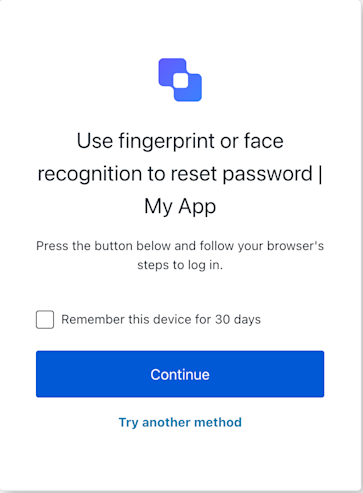 ResetPasswordMfaWebAuthnPlatformChallenge
```ts Example theme={null}
// Assuming 'sdk' is an instance of ResetPasswordMfaWebAuthnPlatformChallenge
try {
await sdk.continueWithPasskey({
rememberDevice: true // if user checked the box and sdk.screen.showRememberDevice is true
});
// On success, Auth0 handles redirection.
} catch (error) {
console.error("Platform authenticator verification failed:", error);
// If it's a WebAuthn API error (DOMException), report it
if (error instanceof DOMException && error.name && error.message) { // DOMException check
await sdk.reportBrowserError({ error: { name: error.name, message: error.message } });
}
// Check sdk.transaction.errors for server-side validation messages if the page reloads.
}
```
## Constructors
Initializes a new instance of the `ResetPasswordMfaWebAuthnPlatformChallenge` class.
It retrieves the necessary context (screen, transaction, etc.) from the global `universal_login_context`
and sets up screen-specific properties via `ScreenOverride`.
#### Throws
If the Universal Login Context is not available or if the screen name
in the context does not match `ResetPasswordMfaWebAuthnPlatformChallenge.screenIdentifier`.
## Properties
BrandingMembers} />
ClientMembers} />
OrganizationMembers} />
PromptMembers} />
ScreenMembersOnResetPasswordMfaWebAuthnPlatformChallenge} />
TenantMembers} />
TransactionMembers} />
UntrustedDataMembers} />
UserMembers} />
static
## Methods
Initiates the WebAuthn platform authenticator challenge by calling `navigator.credentials.get()`
using the challenge options provided in `screen.publicKey`.
If successful, it submits the resulting credential assertion to Auth0 with `action: "default"`.
A promise that resolves when the verification attempt is submitted.
A successful operation typically results in a redirect.
#### Throws
Throws an error if `screen.publicKey` is missing,
if `navigator.credentials.get()` fails (e.g., user cancellation `NotAllowedError`),
or if the form submission to Auth0 fails. If `navigator.credentials.get()` fails
with a `DOMException`, it's recommended to catch that error and call `reportBrowserError`.
```typescript Example theme={null}
// Assuming 'sdk' is an instance of ResetPasswordMfaWebAuthnPlatformChallenge
try {
await sdk.continueWithPasskey({
rememberDevice: true // if user checked the box and sdk.screen.showRememberDevice is true
});
// On success, Auth0 handles redirection.
} catch (error) {
console.error("Platform authenticator verification failed:", error);
// If it's a WebAuthn API error (DOMException), report it
if (error instanceof DOMException && error.name && error.message) { // DOMException check
await sdk.reportBrowserError({ error: { name: error.name, message: error.message } });
}
// Check sdk.transaction.errors for server-side validation messages if the page reloads.
}
```
ResetPasswordMfaWebAuthnPlatformChallengeContinueOptions}>
**Properties**
Error[]}>
Retrieves the array of transaction errors from the context, or an empty array if none exist.
An array of error objects from the transaction context.
Reports a browser-side error that occurred during the `navigator.credentials.get()` API call.
This is used to inform Auth0 about issues like user cancellation (`NotAllowedError`),
timeout, or other WebAuthn API specific errors.
It submits the error details with `action: "showError::{errorDetailsJsonString}"`.
A promise that resolves when the error report is successfully submitted.
#### Throws
If the form submission fails (e.g., network error, invalid state).
```typescript Example theme={null}
// In your UI component, in the catch block of navigator.credentials.get():
// } catch (webAuthnError) {
// if (webAuthnError instanceof DOMException) {
// await sdk.reportBrowserError({
// error: { name: webAuthnError.name, message: webAuthnError.message }
// });
// } else {
// // Handle other types of errors
// }
// }
```
ResetPasswordMfaWebAuthnPlatformChallengeReportErrorOptions}>
An object containing:
* `error`: A `WebAuthnErrorDetails` object with at least `name` and `message` properties
from the `DOMException` thrown by `navigator.credentials.get()`.
* Any other `CustomOptions` to be included in the form submission.
**Properties**
WebAuthnErrorDetails}>
The error object from the WebAuthn API (`navigator.credentials.get()`)
to be reported. Must include `name` and `message`.
Allows the user to opt-out of the WebAuthn platform authenticator challenge and select
a different MFA method for verifying their identity during password reset.
This action submits `action: "pick-authenticator"` to Auth0, which should navigate
the user to an MFA factor selection screen.
A promise that resolves when the 'pick-authenticator' action is submitted.
#### Throws
If the form submission fails (e.g., network error, invalid state).
```typescript Example theme={null}
// In your UI component, when a "Try Another Method" button is clicked:
try {
await sdk.tryAnotherMethod();
// On success, Auth0 handles redirection to the MFA factor selection screen.
} catch (error) {
console.error("Failed to switch MFA method:", error);
}
```
ResetPasswordMfaWebAuthnPlatformChallengeTryAnotherMethodOptions}>
Optional. Any custom parameters to be sent with the request.
These will be included in the form data.
ResetPasswordMfaWebAuthnPlatformChallenge
```ts Example theme={null}
// Assuming 'sdk' is an instance of ResetPasswordMfaWebAuthnPlatformChallenge
try {
await sdk.continueWithPasskey({
rememberDevice: true // if user checked the box and sdk.screen.showRememberDevice is true
});
// On success, Auth0 handles redirection.
} catch (error) {
console.error("Platform authenticator verification failed:", error);
// If it's a WebAuthn API error (DOMException), report it
if (error instanceof DOMException && error.name && error.message) { // DOMException check
await sdk.reportBrowserError({ error: { name: error.name, message: error.message } });
}
// Check sdk.transaction.errors for server-side validation messages if the page reloads.
}
```
## Constructors
Initializes a new instance of the `ResetPasswordMfaWebAuthnPlatformChallenge` class.
It retrieves the necessary context (screen, transaction, etc.) from the global `universal_login_context`
and sets up screen-specific properties via `ScreenOverride`.
#### Throws
If the Universal Login Context is not available or if the screen name
in the context does not match `ResetPasswordMfaWebAuthnPlatformChallenge.screenIdentifier`.
## Properties
BrandingMembers} />
ClientMembers} />
OrganizationMembers} />
PromptMembers} />
ScreenMembersOnResetPasswordMfaWebAuthnPlatformChallenge} />
TenantMembers} />
TransactionMembers} />
UntrustedDataMembers} />
UserMembers} />
static
## Methods
Initiates the WebAuthn platform authenticator challenge by calling `navigator.credentials.get()`
using the challenge options provided in `screen.publicKey`.
If successful, it submits the resulting credential assertion to Auth0 with `action: "default"`.
A promise that resolves when the verification attempt is submitted.
A successful operation typically results in a redirect.
#### Throws
Throws an error if `screen.publicKey` is missing,
if `navigator.credentials.get()` fails (e.g., user cancellation `NotAllowedError`),
or if the form submission to Auth0 fails. If `navigator.credentials.get()` fails
with a `DOMException`, it's recommended to catch that error and call `reportBrowserError`.
```typescript Example theme={null}
// Assuming 'sdk' is an instance of ResetPasswordMfaWebAuthnPlatformChallenge
try {
await sdk.continueWithPasskey({
rememberDevice: true // if user checked the box and sdk.screen.showRememberDevice is true
});
// On success, Auth0 handles redirection.
} catch (error) {
console.error("Platform authenticator verification failed:", error);
// If it's a WebAuthn API error (DOMException), report it
if (error instanceof DOMException && error.name && error.message) { // DOMException check
await sdk.reportBrowserError({ error: { name: error.name, message: error.message } });
}
// Check sdk.transaction.errors for server-side validation messages if the page reloads.
}
```
ResetPasswordMfaWebAuthnPlatformChallengeContinueOptions}>
**Properties**
Error[]}>
Retrieves the array of transaction errors from the context, or an empty array if none exist.
An array of error objects from the transaction context.
Reports a browser-side error that occurred during the `navigator.credentials.get()` API call.
This is used to inform Auth0 about issues like user cancellation (`NotAllowedError`),
timeout, or other WebAuthn API specific errors.
It submits the error details with `action: "showError::{errorDetailsJsonString}"`.
A promise that resolves when the error report is successfully submitted.
#### Throws
If the form submission fails (e.g., network error, invalid state).
```typescript Example theme={null}
// In your UI component, in the catch block of navigator.credentials.get():
// } catch (webAuthnError) {
// if (webAuthnError instanceof DOMException) {
// await sdk.reportBrowserError({
// error: { name: webAuthnError.name, message: webAuthnError.message }
// });
// } else {
// // Handle other types of errors
// }
// }
```
ResetPasswordMfaWebAuthnPlatformChallengeReportErrorOptions}>
An object containing:
* `error`: A `WebAuthnErrorDetails` object with at least `name` and `message` properties
from the `DOMException` thrown by `navigator.credentials.get()`.
* Any other `CustomOptions` to be included in the form submission.
**Properties**
WebAuthnErrorDetails}>
The error object from the WebAuthn API (`navigator.credentials.get()`)
to be reported. Must include `name` and `message`.
Allows the user to opt-out of the WebAuthn platform authenticator challenge and select
a different MFA method for verifying their identity during password reset.
This action submits `action: "pick-authenticator"` to Auth0, which should navigate
the user to an MFA factor selection screen.
A promise that resolves when the 'pick-authenticator' action is submitted.
#### Throws
If the form submission fails (e.g., network error, invalid state).
```typescript Example theme={null}
// In your UI component, when a "Try Another Method" button is clicked:
try {
await sdk.tryAnotherMethod();
// On success, Auth0 handles redirection to the MFA factor selection screen.
} catch (error) {
console.error("Failed to switch MFA method:", error);
}
```
ResetPasswordMfaWebAuthnPlatformChallengeTryAnotherMethodOptions}>
Optional. Any custom parameters to be sent with the request.
These will be included in the form data.