> ## Documentation Index
> Fetch the complete documentation index at: https://auth0.generaltranslation.app/llms.txt
> Use this file to discover all available pages before exploring further.
# LoginEmailVerification
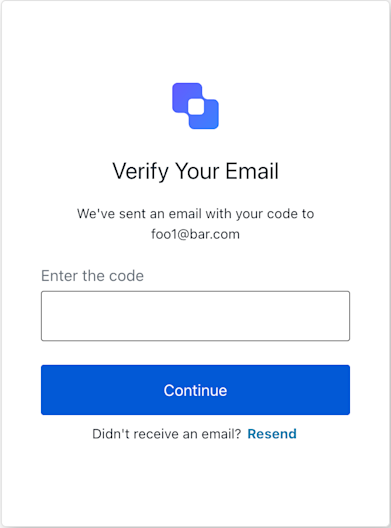 Manages interactions for the "login-email-verification" screen.
This screen prompts the user to enter a one-time code sent to their email address
to verify their identity during the login process.
It provides methods to submit the entered code (`continueWithCode`) or
to request a new code if the original one was not received or has expired (`resendCode`).
Inherits from `BaseContext` to access shared authentication flow data like
transaction state, client information, and internationalization texts.
```typescript Example theme={null}
// How to use the LoginEmailVerification screen SDK:
import LoginEmailVerification from '@auth0/auth0-acul-js/login-email-verification';
// Instantiate the manager for the login email verification screen
const loginEmailVerificationManager = new LoginEmailVerification();
// Accessing screen-specific texts (e.g., for titles, labels, button texts)
const screenTexts = loginEmailVerificationManager.screen.texts;
const pageTitle = screenTexts?.title || 'Verify Your Email';
const codePlaceholder = screenTexts?.codePlaceholder || 'Enter code here';
// Accessing transaction errors from a previous attempt
const transactionErrors = loginEmailVerificationManager.transaction.errors;
if (transactionErrors && transactionErrors.length > 0) {
transactionErrors.forEach(error => {
console.error(`Error Code: ${error.code}, Message: ${error.message}`);
// Display these errors to the user appropriately.
});
}
// Example of handling code submission from a form
async function onCodeSubmit(enteredCode: string) {
try {
await loginEmailVerificationManager.continueWithCode({ code: enteredCode });
// On successful verification, Auth0 will typically redirect the user.
// If there's a validation error (e.g., invalid code), the page will
// re-render, and `loginEmailVerificationManager.transaction.errors` will be updated.
} catch (e) {
// This catch block is for unexpected errors during submission (e.g., network issues).
console.error('An unexpected error occurred while submitting the code:', e);
}
}
// Example of handling a resend code request
async function onResendCodeClick() {
try {
await loginEmailVerificationManager.resendCode();
// Inform the user that a new code has been sent.
// The page might re-render; check `loginEmailVerificationManager.transaction.errors`
// for issues like "too-many-emails".
} catch (e) {
console.error('An unexpected error occurred while resending the code:', e);
}
}
```
## Constructors
Creates an instance of the `LoginEmailVerification` screen manager.
The constructor initializes the `BaseContext`, which involves parsing the
## Properties
BrandingMembers} />
ClientMembers} />
OrganizationMembers} />
PromptMembers} />
ScreenMembers} />
TenantMembers} />
TransactionMembers} />
UntrustedDataMembers} />
UserMembers} />
The unique identifier for the Login Email Verification screen.
This static property is used by the SDK's `BaseContext` to ensure that the
class is instantiated in the correct screen context.
## Methods
Submits the email verification code entered by the user to Auth0.
This method prepares and posts the form data, including the verification code
and the required `action: "default"`, to the `/u/login-email-verification` endpoint.
A promise that resolves once the form submission is initiated.
Typically, a successful submission leads to a server-side redirect.
If the code is incorrect or an error occurs, the page will
re-render, and `this.transaction.errors` will be populated.
#### Throws
If the `payload.code` is missing or not a string. It can also
throw if `FormHandler` encounters an issue during submission (e.g. network error).
Auth0 validation errors (e.g. "invalid-code") are not thrown as JS errors
but are made available in `this.transaction.errors` post-operation.
```typescript Example theme={null}
const manager = new LoginEmailVerification();
// Assuming 'userInputCode' is a string obtained from a form input
manager.continueWithCode({ code: userInputCode })
.catch(err => {
// Handle unexpected submission errors
displayGlobalError("Could not submit your code. Please try again.");
});
// After the operation, check manager.transaction.errors for validation messages.
```
ContinueWithCodeOptionPayload}>
Options for the `continueWithCode` method on the Login Email Verification screen.
This operation is used when the user submits the verification code they received via email
to proceed with the authentication flow.
**Properties**
The verification code sent to the user's email. This is typically a short numeric
or alphanumeric string that the user must enter into the form.
```ts Example 2 theme={null}
"ABCXYZ"
```
Error[]}>
Retrieves the array of transaction errors from the context, or an empty array if none exist.
An array of error objects from the transaction context.
Requests Auth0 to send a new verification code to the user's email address.
This is typically used when the user didn't receive the original code, or it has expired.
This method posts form data with `action: "resend-code"` to the
`/u/login-email-verification` endpoint.
A promise that resolves once the resend request is initiated.
A successful request usually means a new email is dispatched.
The page might re-render, and `this.transaction.errors` could
be updated if, for example, rate limits (`too-many-emails`) are hit.
#### Throws
If `FormHandler` encounters an issue (e.g. network error).
Server-side validation errors (e.g. rate limits) are not thrown
as JS errors but are made available in `this.transaction.errors`.
```typescript Example theme={null}
const manager = new LoginEmailVerification();
manager.resendCode()
.then(() => {
// Inform the user that a new code has been sent.
showNotification("A new verification code is on its way!");
})
.catch(err => {
// Handle unexpected submission errors
displayGlobalError("Could not request a new code. Please try again later.");
});
// After the operation, check manager.transaction.errors for specific issues.
```
ResendCodeOptionsPayload}>
Options for the `resendCode` method on the Login Email Verification screen.
This operation is used when the user requests a new verification code to be sent to their email,
for instance, if they did not receive the initial code or if it has expired.
ResendControl}>
**`Utility Feature`**
Gets resend functionality with timeout management for this screen
ResendControl object with startResend method
```typescript Example theme={null}
import LoginEmailVerification from '@auth0/auth0-acul-js/login-email-verification';
const loginEmailVerification = new LoginEmailVerification();
const { startResend } = loginEmailVerification.resendManager({
timeoutSeconds: 15,
onStatusChange: (remainingSeconds, isDisabled) => {
console.log(`Resend available in ${remainingSeconds}s, disabled: ${isDisabled}`);
},
onTimeout: () => {
console.log('Resend is now available');
}
});
// Call startResend when user clicks resend button
startResend();
```
StartResendOptions}>
Options for configuring resend functionality
**Properties**
OnStatusChangeCallback} />
Manages interactions for the "login-email-verification" screen.
This screen prompts the user to enter a one-time code sent to their email address
to verify their identity during the login process.
It provides methods to submit the entered code (`continueWithCode`) or
to request a new code if the original one was not received or has expired (`resendCode`).
Inherits from `BaseContext` to access shared authentication flow data like
transaction state, client information, and internationalization texts.
```typescript Example theme={null}
// How to use the LoginEmailVerification screen SDK:
import LoginEmailVerification from '@auth0/auth0-acul-js/login-email-verification';
// Instantiate the manager for the login email verification screen
const loginEmailVerificationManager = new LoginEmailVerification();
// Accessing screen-specific texts (e.g., for titles, labels, button texts)
const screenTexts = loginEmailVerificationManager.screen.texts;
const pageTitle = screenTexts?.title || 'Verify Your Email';
const codePlaceholder = screenTexts?.codePlaceholder || 'Enter code here';
// Accessing transaction errors from a previous attempt
const transactionErrors = loginEmailVerificationManager.transaction.errors;
if (transactionErrors && transactionErrors.length > 0) {
transactionErrors.forEach(error => {
console.error(`Error Code: ${error.code}, Message: ${error.message}`);
// Display these errors to the user appropriately.
});
}
// Example of handling code submission from a form
async function onCodeSubmit(enteredCode: string) {
try {
await loginEmailVerificationManager.continueWithCode({ code: enteredCode });
// On successful verification, Auth0 will typically redirect the user.
// If there's a validation error (e.g., invalid code), the page will
// re-render, and `loginEmailVerificationManager.transaction.errors` will be updated.
} catch (e) {
// This catch block is for unexpected errors during submission (e.g., network issues).
console.error('An unexpected error occurred while submitting the code:', e);
}
}
// Example of handling a resend code request
async function onResendCodeClick() {
try {
await loginEmailVerificationManager.resendCode();
// Inform the user that a new code has been sent.
// The page might re-render; check `loginEmailVerificationManager.transaction.errors`
// for issues like "too-many-emails".
} catch (e) {
console.error('An unexpected error occurred while resending the code:', e);
}
}
```
## Constructors
Creates an instance of the `LoginEmailVerification` screen manager.
The constructor initializes the `BaseContext`, which involves parsing the
## Properties
BrandingMembers} />
ClientMembers} />
OrganizationMembers} />
PromptMembers} />
ScreenMembers} />
TenantMembers} />
TransactionMembers} />
UntrustedDataMembers} />
UserMembers} />
The unique identifier for the Login Email Verification screen.
This static property is used by the SDK's `BaseContext` to ensure that the
class is instantiated in the correct screen context.
## Methods
Submits the email verification code entered by the user to Auth0.
This method prepares and posts the form data, including the verification code
and the required `action: "default"`, to the `/u/login-email-verification` endpoint.
A promise that resolves once the form submission is initiated.
Typically, a successful submission leads to a server-side redirect.
If the code is incorrect or an error occurs, the page will
re-render, and `this.transaction.errors` will be populated.
#### Throws
If the `payload.code` is missing or not a string. It can also
throw if `FormHandler` encounters an issue during submission (e.g. network error).
Auth0 validation errors (e.g. "invalid-code") are not thrown as JS errors
but are made available in `this.transaction.errors` post-operation.
```typescript Example theme={null}
const manager = new LoginEmailVerification();
// Assuming 'userInputCode' is a string obtained from a form input
manager.continueWithCode({ code: userInputCode })
.catch(err => {
// Handle unexpected submission errors
displayGlobalError("Could not submit your code. Please try again.");
});
// After the operation, check manager.transaction.errors for validation messages.
```
ContinueWithCodeOptionPayload}>
Options for the `continueWithCode` method on the Login Email Verification screen.
This operation is used when the user submits the verification code they received via email
to proceed with the authentication flow.
**Properties**
The verification code sent to the user's email. This is typically a short numeric
or alphanumeric string that the user must enter into the form.
```ts Example 2 theme={null}
"ABCXYZ"
```
Error[]}>
Retrieves the array of transaction errors from the context, or an empty array if none exist.
An array of error objects from the transaction context.
Requests Auth0 to send a new verification code to the user's email address.
This is typically used when the user didn't receive the original code, or it has expired.
This method posts form data with `action: "resend-code"` to the
`/u/login-email-verification` endpoint.
A promise that resolves once the resend request is initiated.
A successful request usually means a new email is dispatched.
The page might re-render, and `this.transaction.errors` could
be updated if, for example, rate limits (`too-many-emails`) are hit.
#### Throws
If `FormHandler` encounters an issue (e.g. network error).
Server-side validation errors (e.g. rate limits) are not thrown
as JS errors but are made available in `this.transaction.errors`.
```typescript Example theme={null}
const manager = new LoginEmailVerification();
manager.resendCode()
.then(() => {
// Inform the user that a new code has been sent.
showNotification("A new verification code is on its way!");
})
.catch(err => {
// Handle unexpected submission errors
displayGlobalError("Could not request a new code. Please try again later.");
});
// After the operation, check manager.transaction.errors for specific issues.
```
ResendCodeOptionsPayload}>
Options for the `resendCode` method on the Login Email Verification screen.
This operation is used when the user requests a new verification code to be sent to their email,
for instance, if they did not receive the initial code or if it has expired.
ResendControl}>
**`Utility Feature`**
Gets resend functionality with timeout management for this screen
ResendControl object with startResend method
```typescript Example theme={null}
import LoginEmailVerification from '@auth0/auth0-acul-js/login-email-verification';
const loginEmailVerification = new LoginEmailVerification();
const { startResend } = loginEmailVerification.resendManager({
timeoutSeconds: 15,
onStatusChange: (remainingSeconds, isDisabled) => {
console.log(`Resend available in ${remainingSeconds}s, disabled: ${isDisabled}`);
},
onTimeout: () => {
console.log('Resend is now available');
}
});
// Call startResend when user clicks resend button
startResend();
```
StartResendOptions}>
Options for configuring resend functionality
**Properties**
OnStatusChangeCallback} />