> ## Documentation Index
> Fetch the complete documentation index at: https://auth0.generaltranslation.app/llms.txt
> Use this file to discover all available pages before exploring further.

> Learn how to rotate an application's client secret using the Auth Dashboard or the Management API.

# Rotate Client Secrets

export const AuthCodeGroup = ({children, dropdown}) => {
  const [processedChildren, setProcessedChildren] = useState(children);
  useEffect(() => {
    let unsubscribe = null;
    function init() {
      unsubscribe = window.autorun(() => {
        const processChildren = node => {
          if (typeof node === "string") {
            let processedNode = node;
            for (const [key, value] of window.rootStore.variableStore.values.entries()) {
              processedNode = processedNode.replace(new RegExp(key, "g"), value);
            }
            return processedNode;
          } else if (Array.isArray(node)) {
            return node.map(processChildren);
          } else if (node && node.props && node.props.children) {
            return {
              ...node,
              props: {
                ...node.props,
                children: processChildren(node.props.children)
              }
            };
          }
          return node;
        };
        setProcessedChildren(processChildren(children));
      });
    }
    if (window.rootStore) {
      init();
    } else {
      window.addEventListener("adu:storeReady", init);
    }
    return () => {
      window.removeEventListener("adu:storeReady", init);
      unsubscribe?.();
    };
  }, [children]);
  return <CodeGroup dropdown={dropdown}>{processedChildren}</CodeGroup>;
};

export const AuthCodeBlock = ({filename, icon, language, highlight, children}) => {
  const [processedChildren, setProcessedChildren] = useState(children);
  useEffect(() => {
    let unsubscribe = null;
    function init() {
      unsubscribe = window.autorun(() => {
        let processedChildren = children;
        for (const [key, value] of window.rootStore.variableStore.values.entries()) {
          processedChildren = processedChildren.replace(new RegExp(key, "g"), value);
        }
        setProcessedChildren(processedChildren);
      });
    }
    if (window.rootStore) {
      init();
    } else {
      window.addEventListener("adu:storeReady", init);
    }
    return () => {
      window.removeEventListener("adu:storeReady", init);
      unsubscribe?.();
    };
  }, [children]);
  return <CodeBlock filename={filename} icon={icon} language={language} lines highlight={highlight}>
      {processedChildren}
    </CodeBlock>;
};

You can change an application's <Tooltip tip="Client Secret: Secret used by a client (application) to authenticate with the Authorization Server; it should be known to only the client and the Authorization Server and must be sufficiently random to not be guessable." cta="View Glossary" href="/docs/glossary?term=client+secret">client secret</Tooltip> using the <Tooltip tip="Client Secret: Secret used by a client (application) to authenticate with the Authorization Server; it should be known to only the client and the Authorization Server and must be sufficiently random to not be guessable." cta="View Glossary" href="/docs/glossary?term=Auth0+Dashboard">Auth0 Dashboard</Tooltip> or the Auth0 <Tooltip tip="Auth0 Dashboard: Auth0's main product to configure your services." cta="View Glossary" href="/docs/glossary?term=Management+API">Management API</Tooltip>. When you rotate a client secret, you must update any authorized applications with the new value.

<Callout icon="file-lines" color="#0EA5E9" iconType="regular">
  Client secrets should not be stored in public client applications. To learn more, read [Confidential and Public Applications.](/docs/get-started/applications/confidential-and-public-applications)
</Callout>

<Warning>
  New secrets may be delayed up to thirty seconds while rotating. To minimize downtime, we suggest you store the new client secret in your application's code/system configuration as a fallback to the previous secret. This way, if the client application request doesn't work with the old secret, your app will use the new secret.

  Secrets can be stored in a list (or similar structure) until they're no longer needed. Once you're sure that an old secret is obsolete, you can remove its value from your app's code.
</Warning>

## Use the Dashboard

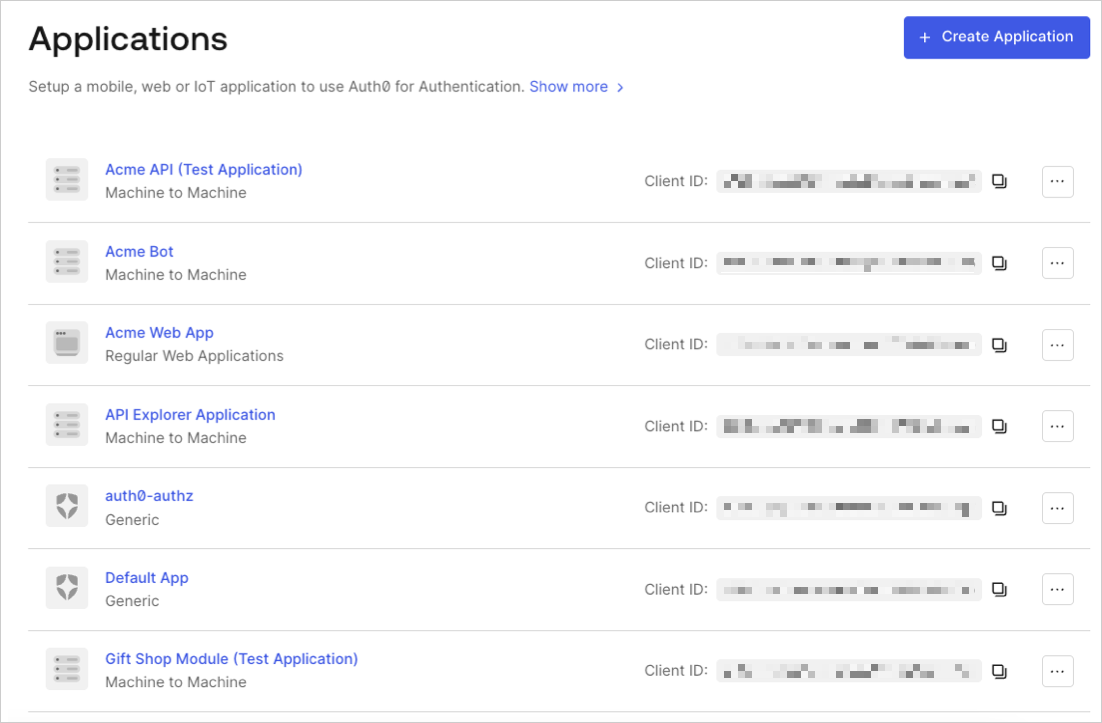
1. In the Auth0 Dashboard, go to [Applications > Applications](https://manage.auth0.com/#/applications), and then select the name of the application to view.

   <Frame>
     <img src="https://mintcdn.com/generaltranslationinc/6Eil8sR_4nvgRMz0/docs/images/cdy7uua7fh8z/1ecNwGgFQZxdP57p0tp3jT/cd608fcfae22e195b604e2707e5a848d/App_List_-_EN.png?fit=max&auto=format&n=6Eil8sR_4nvgRMz0&q=85&s=fb8d86c7a33f1f8f5d6c9cc932088c6e" alt="Dashboard Applications List" width="1102" height="723" data-path="docs/images/cdy7uua7fh8z/1ecNwGgFQZxdP57p0tp3jT/cd608fcfae22e195b604e2707e5a848d/App_List_-_EN.png" />
   </Frame>
2. Scroll to the bottom of the **Settings** page, locate the **Danger Zone**, select **Rotate**, and confirm.
3. Scroll to the top of the page, and switch to the **Credentials** tab.
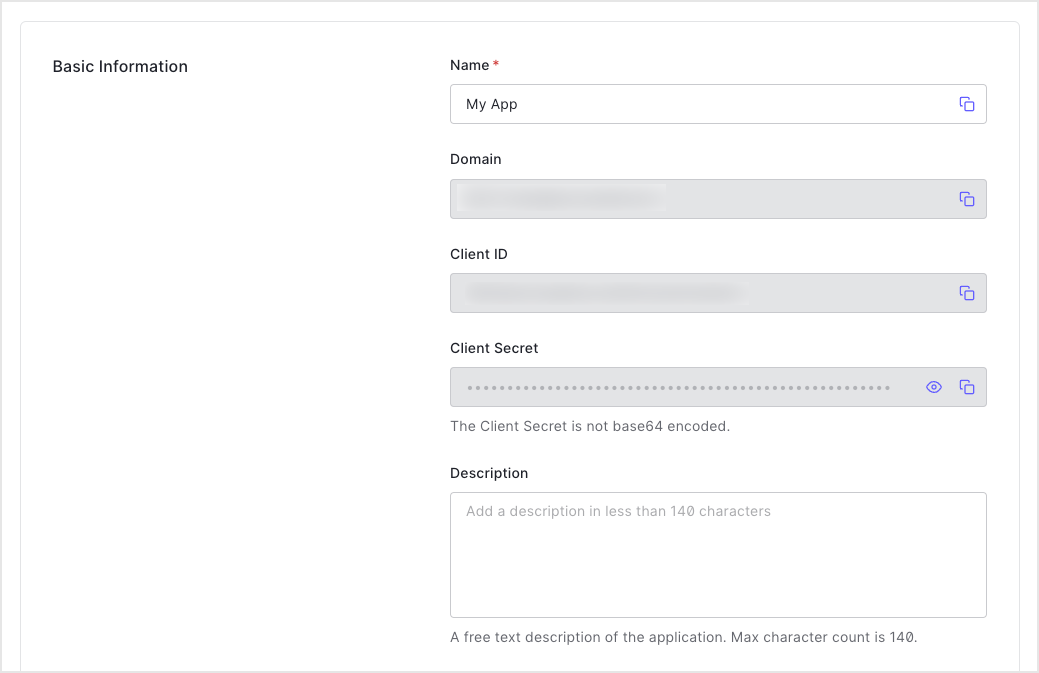
4. View your new secret by locating **Client Secret**, and selecting the eye icon.
   <Frame>
     <img src="https://mintcdn.com/generaltranslationinc/bJAwjuRiJwaYWdNy/docs/images/cdy7uua7fh8z/2GPUw7BODYuYYH3658Upz3/92a49ec57e6b4d07be96093989baac03/2023-04-11_15-34-58.png?fit=max&auto=format&n=bJAwjuRiJwaYWdNy&q=85&s=df586e5c1577d6502854b24fa7edf27b" alt="Dashboard Applications Application Settings Tab Basic Information" width="1039" height="673" data-path="docs/images/cdy7uua7fh8z/2GPUw7BODYuYYH3658Upz3/92a49ec57e6b4d07be96093989baac03/2023-04-11_15-34-58.png" />
   </Frame>
5. Update authorized applications with the new value.

## Use the Management API

1. Call the Management API [Rotate a client secret](https://auth0.com/docs/api/management/v2#!/Clients/post_rotate_secret) endpoint. Replace the `{yourClientId}` and `MGMT_API_ACCESS_TOKEN` placeholder values with your client ID and Management API access token, respectively.

<AuthCodeGroup>
  ```bash cURL theme={null}
     curl --request POST \
  --url 'https://{yourDomain}/api/v2/clients/%7ByourClientId%7D/rotate-secret' \
  --header 'authorization: Bearer {yourMgmtApiAccessToken}'

  ```

  ```csharp C# theme={null}
     var client = new RestClient("https://{yourDomain}/api/v2/clients/%7ByourClientId%7D/rotate-secret");
  var request = new RestRequest(Method.POST);
  request.AddHeader("authorization", "Bearer {yourMgmtApiAccessToken}");
  IRestResponse response = client.Execute(request);

  ```

  ```go Go theme={null}
     package main

  import (
  "fmt"
  "net/http"
  "io/ioutil"
  )

  func main() {

  url := "https://{yourDomain}/api/v2/clients/%7ByourClientId%7D/rotate-secret"

  req, _ := http.NewRequest("POST", url, nil)

  req.Header.Add("authorization", "Bearer {yourMgmtApiAccessToken}")

  res, _ := http.DefaultClient.Do(req)

  defer res.Body.Close()
  body, _ := ioutil.ReadAll(res.Body)

  fmt.Println(res)
  fmt.Println(string(body))

  }

  ```

  ```java Java theme={null}
     HttpResponse response = Unirest.post("https://{yourDomain}/api/v2/clients/%7ByourClientId%7D/rotate-secret")
    .header("authorization", "Bearer {yourMgmtApiAccessToken}")
    .asString();

  ```

  ```javascript Node.JS theme={null}
     var axios = require("axios").default;

  var options = {
    method: 'POST',
    url: 'https://{yourDomain}/api/v2/clients/%7ByourClientId%7D/rotate-secret',
    headers: {authorization: 'Bearer {yourMgmtApiAccessToken}'}
  };

  axios.request(options).then(function (response) {
    console.log(response.data);
  }).catch(function (error) {
    console.error(error);
  });

  ```

  ```objc Obj-C theme={null}
     #import <Foundation/Foundation.h>

  NSDictionary *headers = @{ @"authorization": @"Bearer {yourMgmtApiAccessToken}" };

  NSMutableURLRequest *request = [NSMutableURLRequest requestWithURL:[NSURL URLWithString:@"https://{yourDomain}/api/v2/clients/%7ByourClientId%7D/rotate-secret"]
                                                        cachePolicy:NSURLRequestUseProtocolCachePolicy
                                                    timeoutInterval:10.0];
  [request setHTTPMethod:@"POST"];
  [request setAllHTTPHeaderFields:headers];

  NSURLSession *session = [NSURLSession sharedSession];
  NSURLSessionDataTask *dataTask = [session dataTaskWithRequest:request
                                              completionHandler:^(NSData *data, NSURLResponse *response, NSError *error) {
                                                  if (error) {
                                                      NSLog(@"%@", error);
                                                  } else {
                                                      NSHTTPURLResponse *httpResponse = (NSHTTPURLResponse *) response;
                                                      NSLog(@"%@", httpResponse);
                                                  }
                                              }];
  [dataTask resume];

  ```

  ```php PHP theme={null}
     $curl = curl_init();

  curl_setopt_array($curl, [
    CURLOPT_URL => "https://{yourDomain}/api/v2/clients/%7ByourClientId%7D/rotate-secret",
    CURLOPT_RETURNTRANSFER => true,
    CURLOPT_ENCODING => "",
    CURLOPT_MAXREDIRS => 10,
    CURLOPT_TIMEOUT => 30,
    CURLOPT_HTTP_VERSION => CURL_HTTP_VERSION_1_1,
    CURLOPT_CUSTOMREQUEST => "POST",
    CURLOPT_HTTPHEADER => [
      "authorization: Bearer {yourMgmtApiAccessToken}"
    ],
  ]);

  $response = curl_exec($curl);
  $err = curl_error($curl);

  curl_close($curl);

  if ($err) {
    echo "cURL Error #:" . $err;
  } else {
    echo $response;
  }

  ```

  ```python Python theme={null}
     import http.client

  conn = http.client.HTTPSConnection("")

  headers = { 'authorization': "Bearer {yourMgmtApiAccessToken}" }

  conn.request("POST", "/{yourDomain}/api/v2/clients/%7ByourClientId%7D/rotate-secret", headers=headers)

  res = conn.getresponse()

  data = res.read()

  print(data.decode("utf-8"))

  ```

  ```ruby Ruby theme={null}
     require 'uri'
  require 'net/http'
  require 'openssl'
  url = URI("https://{yourDomain}/api/v2/clients/%7ByourClientId%7D/rotate-secret")
  http = Net::HTTP.new(url.host, url.port)
  http.use_ssl = true
  http.verify_mode = OpenSSL::SSL::VERIFY_NONE
  request = Net::HTTP::Post.new(url)
  request["authorization"] = 'Bearer {yourMgmtApiAccessToken}'
  response = http.request(request)
  puts response.read_body

  ```

  ```swift Swift theme={null}
     import Foundation

  let headers = ["authorization": "Bearer {yourMgmtApiAccessToken}"]

  let request = NSMutableURLRequest(url: NSURL(string: "https://{yourDomain}/api/v2/clients/%7ByourClientId%7D/rotate-secret")! as URL,
                                          cachePolicy: .useProtocolCachePolicy,
                                      timeoutInterval: 10.0)
  request.httpMethod = "POST"
  request.allHTTPHeaderFields = headers

  let session = URLSession.shared
  let dataTask = session.dataTask(with: request as URLRequest, completionHandler: { (data, response, error) -> Void in
    if (error != nil) {
      print(error)
    } else {
      let httpResponse = response as? HTTPURLResponse
      print(httpResponse)
    }
  })

  dataTask.resume()

  ```
</AuthCodeGroup>

<table class="table">
  <thead>
    <tr>
      <th><strong>Value</strong></th>
      <th><strong>Description</strong></th>
    </tr>
  </thead>

  <tbody>
    <tr>
      <td>
        <code>
          {yourClientId}
        </code>
      </td>

      <td>Τhe ID of the application to be updated.</td>
    </tr>

    <tr>
      <td><code>MGMT\_API\_ACCESS\_TOKEN</code></td>
      <td><a href="https://auth0.com/docs/api/management/v2/tokens">Access Tokens for the Management API</a> with the scope  <code>update:client\_keys</code>.</td>
    </tr>
  </tbody>
</table>

2. Update authorized applications with the new value.

### Set a custom client secret

You can use the Management API [Update a client](https://auth0.com/docs/api/management/v2/#!/Clients/patch_clients_by_id) endpoint to to set a client secret manually instead of requesting a rotation to an automatically generated secret. Your application is configured with the future secret as a fallback ahead of the actual rotation.

```bash lines theme={null}
   curl --request PATCH \
   --url https://{TenantDomain}/api/v2/clients/{ClientID} \
   --header 'Authorization: Bearer {AccessToken}' \
   --header 'Content-Type: application/json' \
   --data '{
      "client_secret": "{CustomClientSecret}"
      }'
```

## Learn more

* [View Signing Certificates](/docs/get-started/tenant-settings/signing-keys/view-signing-certificates)
* [Signing Algorithms](/docs/get-started/applications/signing-algorithms)
* [Change Application Signing Algorithms](/docs/get-started/applications/change-application-signing-algorithms)
