> ## Documentation Index
> Fetch the complete documentation index at: https://auth0.generaltranslation.app/llms.txt
> Use this file to discover all available pages before exploring further.

> Configure an update policy form using Forms for Actions

# Use Cases: Configure an update policy form using Forms

<Card title="Before you start">
  1. Create a [Machine-to-Machine Application](/docs/get-started/auth0-overview/create-applications/machine-to-machine-apps) with the following scopes enabled:

  * `read:users`
  * `update:users`
  * `create:users`
  * `read:users_app_metadata`
  * `update:users_app_metadata`
  * `create:users_app_metadata`

  2. Add a [Vault connection](/docs/customize/forms/vault) using the M2M application credentials.
</Card>

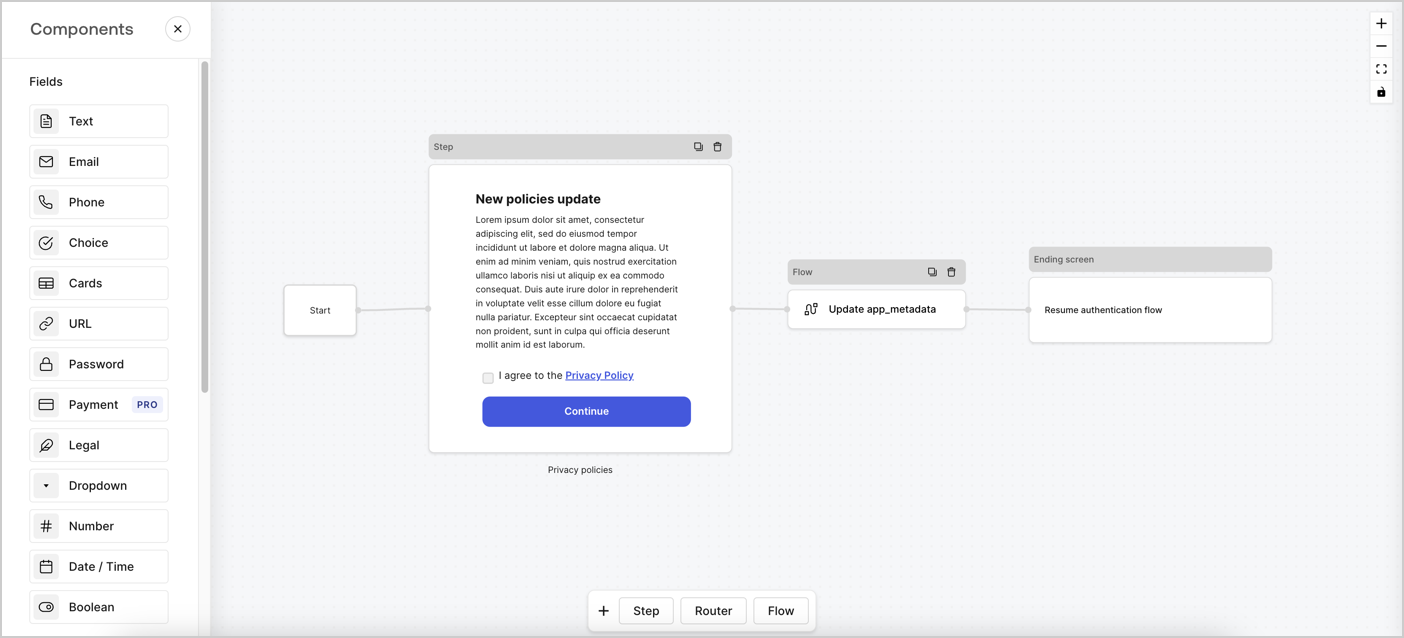
Forms for Actions allows you to create custom privacy policies flows and store the consent under the `app_metadata` object.
<Frame>
  <img src="https://mintcdn.com/generaltranslationinc/Q_4pAdRoZm2wi1v5/docs/images/cdy7uua7fh8z/6i68dMvHDTijfRmSgN1x8Q/ad900e7d4c0fb34645921435472b8684/privavy-policy-form.png?fit=max&auto=format&n=Q_4pAdRoZm2wi1v5&q=85&s=dbe2bfcdc6de71f59a6568dc51c0a1eb" alt="Dashboard > Actions > Forms > Privacy policy use case" data-og-width="1404" width="1404" data-og-height="638" height="638" data-path="docs/images/cdy7uua7fh8z/6i68dMvHDTijfRmSgN1x8Q/ad900e7d4c0fb34645921435472b8684/privavy-policy-form.png" data-optimize="true" data-opv="3" srcset="https://mintcdn.com/generaltranslationinc/Q_4pAdRoZm2wi1v5/docs/images/cdy7uua7fh8z/6i68dMvHDTijfRmSgN1x8Q/ad900e7d4c0fb34645921435472b8684/privavy-policy-form.png?w=280&fit=max&auto=format&n=Q_4pAdRoZm2wi1v5&q=85&s=2ae16f693063270e3a814846d7a39683 280w, https://mintcdn.com/generaltranslationinc/Q_4pAdRoZm2wi1v5/docs/images/cdy7uua7fh8z/6i68dMvHDTijfRmSgN1x8Q/ad900e7d4c0fb34645921435472b8684/privavy-policy-form.png?w=560&fit=max&auto=format&n=Q_4pAdRoZm2wi1v5&q=85&s=b4fafcbe2442d1a9ebf0490c026fae39 560w, https://mintcdn.com/generaltranslationinc/Q_4pAdRoZm2wi1v5/docs/images/cdy7uua7fh8z/6i68dMvHDTijfRmSgN1x8Q/ad900e7d4c0fb34645921435472b8684/privavy-policy-form.png?w=840&fit=max&auto=format&n=Q_4pAdRoZm2wi1v5&q=85&s=d0ffabe5d44206e31e5011e3fb41e345 840w, https://mintcdn.com/generaltranslationinc/Q_4pAdRoZm2wi1v5/docs/images/cdy7uua7fh8z/6i68dMvHDTijfRmSgN1x8Q/ad900e7d4c0fb34645921435472b8684/privavy-policy-form.png?w=1100&fit=max&auto=format&n=Q_4pAdRoZm2wi1v5&q=85&s=0113e0d174464b89e3ddefc0fc2edd8a 1100w, https://mintcdn.com/generaltranslationinc/Q_4pAdRoZm2wi1v5/docs/images/cdy7uua7fh8z/6i68dMvHDTijfRmSgN1x8Q/ad900e7d4c0fb34645921435472b8684/privavy-policy-form.png?w=1650&fit=max&auto=format&n=Q_4pAdRoZm2wi1v5&q=85&s=75919e789695e589c5877ad761b24d67 1650w, https://mintcdn.com/generaltranslationinc/Q_4pAdRoZm2wi1v5/docs/images/cdy7uua7fh8z/6i68dMvHDTijfRmSgN1x8Q/ad900e7d4c0fb34645921435472b8684/privavy-policy-form.png?w=2500&fit=max&auto=format&n=Q_4pAdRoZm2wi1v5&q=85&s=5351615ea75ed31da0f13fb916dfb3c5 2500w" />
</Frame>

The sections below outline how you can create an Update Policy form using nodes and flows, along with steps for adding your form to a [Post Login](/docs/customize/actions/explore-triggers/signup-and-login-triggers/login-trigger) Action.

## Create a form from scratch

Follow these steps to create a form to gather information:

1. Open the Form editor by selecting **Auth0 Dashboard > Actions > Forms.**
2. Select **Create Form** > **Start from scratch**.

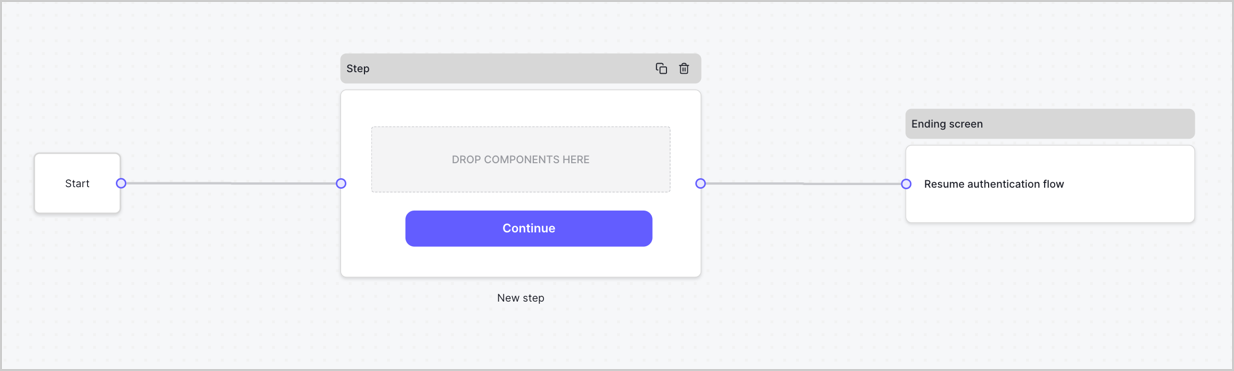
By default, a new form contains a Start node, a Step node, and an Ending screen node.
<Frame>
  <img src="https://mintcdn.com/generaltranslationinc/bJAwjuRiJwaYWdNy/docs/images/cdy7uua7fh8z/2TZ9jSjgEcARFpULI6hz4R/a4319a1bd482f2ee5cc23100fdb2f42c/New-form-Forms-for-action-use-case.png?fit=max&auto=format&n=bJAwjuRiJwaYWdNy&q=85&s=18ea7fe138d4d26673f091ff04ddb775" alt="Dashboard > Forms > Use Cases > Form" data-og-width="1234" width="1234" data-og-height="371" height="371" data-path="docs/images/cdy7uua7fh8z/2TZ9jSjgEcARFpULI6hz4R/a4319a1bd482f2ee5cc23100fdb2f42c/New-form-Forms-for-action-use-case.png" data-optimize="true" data-opv="3" srcset="https://mintcdn.com/generaltranslationinc/bJAwjuRiJwaYWdNy/docs/images/cdy7uua7fh8z/2TZ9jSjgEcARFpULI6hz4R/a4319a1bd482f2ee5cc23100fdb2f42c/New-form-Forms-for-action-use-case.png?w=280&fit=max&auto=format&n=bJAwjuRiJwaYWdNy&q=85&s=b43b21ab326c6de338ad68822a934512 280w, https://mintcdn.com/generaltranslationinc/bJAwjuRiJwaYWdNy/docs/images/cdy7uua7fh8z/2TZ9jSjgEcARFpULI6hz4R/a4319a1bd482f2ee5cc23100fdb2f42c/New-form-Forms-for-action-use-case.png?w=560&fit=max&auto=format&n=bJAwjuRiJwaYWdNy&q=85&s=5394e32091244455cb08c16e53ee3e43 560w, https://mintcdn.com/generaltranslationinc/bJAwjuRiJwaYWdNy/docs/images/cdy7uua7fh8z/2TZ9jSjgEcARFpULI6hz4R/a4319a1bd482f2ee5cc23100fdb2f42c/New-form-Forms-for-action-use-case.png?w=840&fit=max&auto=format&n=bJAwjuRiJwaYWdNy&q=85&s=7cbc58b6261dece5b9ec3ebca006a2d6 840w, https://mintcdn.com/generaltranslationinc/bJAwjuRiJwaYWdNy/docs/images/cdy7uua7fh8z/2TZ9jSjgEcARFpULI6hz4R/a4319a1bd482f2ee5cc23100fdb2f42c/New-form-Forms-for-action-use-case.png?w=1100&fit=max&auto=format&n=bJAwjuRiJwaYWdNy&q=85&s=16767b91993aeb301c0bcad2c573af9f 1100w, https://mintcdn.com/generaltranslationinc/bJAwjuRiJwaYWdNy/docs/images/cdy7uua7fh8z/2TZ9jSjgEcARFpULI6hz4R/a4319a1bd482f2ee5cc23100fdb2f42c/New-form-Forms-for-action-use-case.png?w=1650&fit=max&auto=format&n=bJAwjuRiJwaYWdNy&q=85&s=0832d4f7babb0396a45e2e4a2ed8af56 1650w, https://mintcdn.com/generaltranslationinc/bJAwjuRiJwaYWdNy/docs/images/cdy7uua7fh8z/2TZ9jSjgEcARFpULI6hz4R/a4319a1bd482f2ee5cc23100fdb2f42c/New-form-Forms-for-action-use-case.png?w=2500&fit=max&auto=format&n=bJAwjuRiJwaYWdNy&q=85&s=29b1cbdc1593ccf0ddc3184d216f4cb7 2500w" />
</Frame>

### Configure the Step node

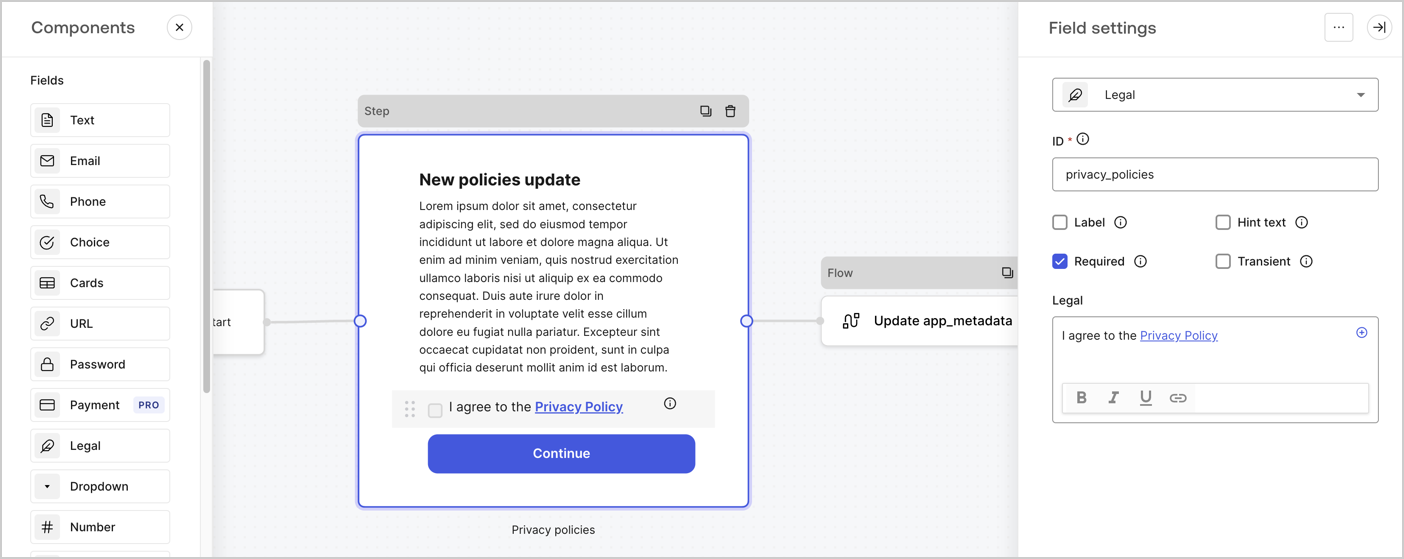
The Step node is the graphical interface visible to users. Add [Fields](/docs/customize/forms/nodes-and-components) to the Step node to collect the new agreement acceptance value by following these steps:

1. Drag a **Rich text** field from the **Components menu** into the **Step** node.

   * **Rich text**: Enter a description of your privacy policies updates.
   * Select **Save**.
2. Drag a **Legal** field into the **Step** node.

   * **ID**: Enter `privacy_policies`.
   * **Required**: Enable the checkbox.
   * **Legal**: Enter `I agree to the Privacy Policy`.
   * Select **Save**.
3. Select **Publish** to save.
<Frame>
  <img src="https://mintcdn.com/generaltranslationinc/Tx-zTp2kMjjdY0gu/docs/images/cdy7uua7fh8z/59zFFjQjAnjogkc2QGIqqJ/0ad66b1b636544122aa4e65968b76c2c/privacy-policy-step-node.png?fit=max&auto=format&n=Tx-zTp2kMjjdY0gu&q=85&s=f53efae38ed82c29a4ac0fa4345a6ec8" alt="Dashboard > Actions > Forms > Use case privacy policy step node" data-og-width="1404" width="1404" data-og-height="559" height="559" data-path="docs/images/cdy7uua7fh8z/59zFFjQjAnjogkc2QGIqqJ/0ad66b1b636544122aa4e65968b76c2c/privacy-policy-step-node.png" data-optimize="true" data-opv="3" srcset="https://mintcdn.com/generaltranslationinc/Tx-zTp2kMjjdY0gu/docs/images/cdy7uua7fh8z/59zFFjQjAnjogkc2QGIqqJ/0ad66b1b636544122aa4e65968b76c2c/privacy-policy-step-node.png?w=280&fit=max&auto=format&n=Tx-zTp2kMjjdY0gu&q=85&s=8c0c767776c167cc382082ea0b0a840e 280w, https://mintcdn.com/generaltranslationinc/Tx-zTp2kMjjdY0gu/docs/images/cdy7uua7fh8z/59zFFjQjAnjogkc2QGIqqJ/0ad66b1b636544122aa4e65968b76c2c/privacy-policy-step-node.png?w=560&fit=max&auto=format&n=Tx-zTp2kMjjdY0gu&q=85&s=75e0568f26d99a626e3c980fb5d7a0f5 560w, https://mintcdn.com/generaltranslationinc/Tx-zTp2kMjjdY0gu/docs/images/cdy7uua7fh8z/59zFFjQjAnjogkc2QGIqqJ/0ad66b1b636544122aa4e65968b76c2c/privacy-policy-step-node.png?w=840&fit=max&auto=format&n=Tx-zTp2kMjjdY0gu&q=85&s=0c8645766aecb6dae2b9745e2539b47c 840w, https://mintcdn.com/generaltranslationinc/Tx-zTp2kMjjdY0gu/docs/images/cdy7uua7fh8z/59zFFjQjAnjogkc2QGIqqJ/0ad66b1b636544122aa4e65968b76c2c/privacy-policy-step-node.png?w=1100&fit=max&auto=format&n=Tx-zTp2kMjjdY0gu&q=85&s=c78684ea87d55cd1fc710688c926503c 1100w, https://mintcdn.com/generaltranslationinc/Tx-zTp2kMjjdY0gu/docs/images/cdy7uua7fh8z/59zFFjQjAnjogkc2QGIqqJ/0ad66b1b636544122aa4e65968b76c2c/privacy-policy-step-node.png?w=1650&fit=max&auto=format&n=Tx-zTp2kMjjdY0gu&q=85&s=4c66382432b3abc085f263325634ed2d 1650w, https://mintcdn.com/generaltranslationinc/Tx-zTp2kMjjdY0gu/docs/images/cdy7uua7fh8z/59zFFjQjAnjogkc2QGIqqJ/0ad66b1b636544122aa4e65968b76c2c/privacy-policy-step-node.png?w=2500&fit=max&auto=format&n=Tx-zTp2kMjjdY0gu&q=85&s=5e625f0cfdaf8ecf72cec56878878792 2500w" />
</Frame>

### Configure the Flow node

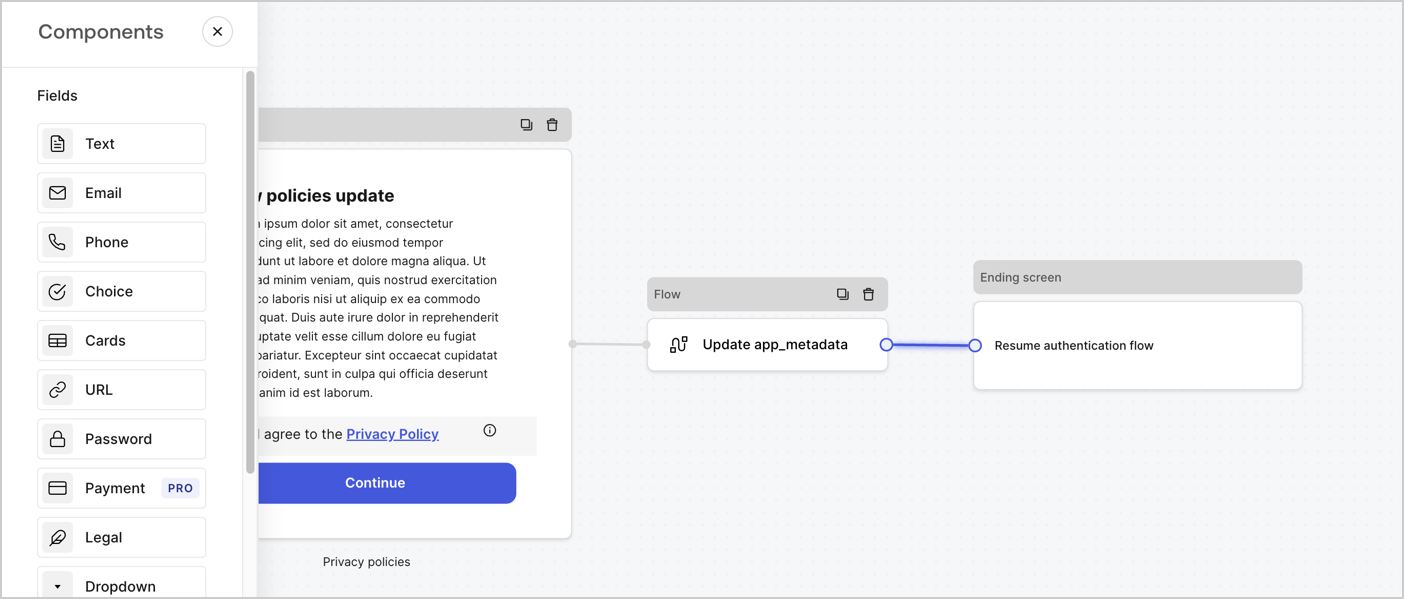
Add a **Flow** node after the **Step** node to update the `app_metadata` and resume the authentication flow by following these steps:

1. Select **Flow** from the bottom of the Form editor.
2. Remove the existing link between the **Step** and **Ending Screen** nodes.
3. Select the new **Flow** > **Click to add a flow** > **Create a new flow.**

   * Enter `Update app_metadata` in the **Name** field.
   * Select **Create**.
   * Select **Save**.
4. Link the **Flow** node to the **Step** and **Ending Screen** nodes as pictured below.
5. Select **Publish** to save.
<Frame>
  <img src="https://mintcdn.com/generaltranslationinc/Q_4pAdRoZm2wi1v5/docs/images/cdy7uua7fh8z/6YIkzm7SrpM9LW76AXuRzh/353c518fe82bbaa440836da1d83596d6/link-policies.png?fit=max&auto=format&n=Q_4pAdRoZm2wi1v5&q=85&s=8909819fefb0d3c1e4d9bae2db7905a6" alt="Dashboard > Actions > Forms > Form" data-og-width="1404" width="1404" data-og-height="599" height="599" data-path="docs/images/cdy7uua7fh8z/6YIkzm7SrpM9LW76AXuRzh/353c518fe82bbaa440836da1d83596d6/link-policies.png" data-optimize="true" data-opv="3" srcset="https://mintcdn.com/generaltranslationinc/Q_4pAdRoZm2wi1v5/docs/images/cdy7uua7fh8z/6YIkzm7SrpM9LW76AXuRzh/353c518fe82bbaa440836da1d83596d6/link-policies.png?w=280&fit=max&auto=format&n=Q_4pAdRoZm2wi1v5&q=85&s=1f3ba4e86a2e7c9d3e703c397204e009 280w, https://mintcdn.com/generaltranslationinc/Q_4pAdRoZm2wi1v5/docs/images/cdy7uua7fh8z/6YIkzm7SrpM9LW76AXuRzh/353c518fe82bbaa440836da1d83596d6/link-policies.png?w=560&fit=max&auto=format&n=Q_4pAdRoZm2wi1v5&q=85&s=35693b40871afc00235896b6201aad68 560w, https://mintcdn.com/generaltranslationinc/Q_4pAdRoZm2wi1v5/docs/images/cdy7uua7fh8z/6YIkzm7SrpM9LW76AXuRzh/353c518fe82bbaa440836da1d83596d6/link-policies.png?w=840&fit=max&auto=format&n=Q_4pAdRoZm2wi1v5&q=85&s=fc3a72cb8290ce61ba1738c57e258017 840w, https://mintcdn.com/generaltranslationinc/Q_4pAdRoZm2wi1v5/docs/images/cdy7uua7fh8z/6YIkzm7SrpM9LW76AXuRzh/353c518fe82bbaa440836da1d83596d6/link-policies.png?w=1100&fit=max&auto=format&n=Q_4pAdRoZm2wi1v5&q=85&s=0e4eac00a9aaaa0b7a3d983c28ed4136 1100w, https://mintcdn.com/generaltranslationinc/Q_4pAdRoZm2wi1v5/docs/images/cdy7uua7fh8z/6YIkzm7SrpM9LW76AXuRzh/353c518fe82bbaa440836da1d83596d6/link-policies.png?w=1650&fit=max&auto=format&n=Q_4pAdRoZm2wi1v5&q=85&s=6e1f0cd8e4f8acb3635f47984774c041 1650w, https://mintcdn.com/generaltranslationinc/Q_4pAdRoZm2wi1v5/docs/images/cdy7uua7fh8z/6YIkzm7SrpM9LW76AXuRzh/353c518fe82bbaa440836da1d83596d6/link-policies.png?w=2500&fit=max&auto=format&n=Q_4pAdRoZm2wi1v5&q=85&s=a83ac0aed205625784d8dbbbf5958c70 2500w" />
</Frame>

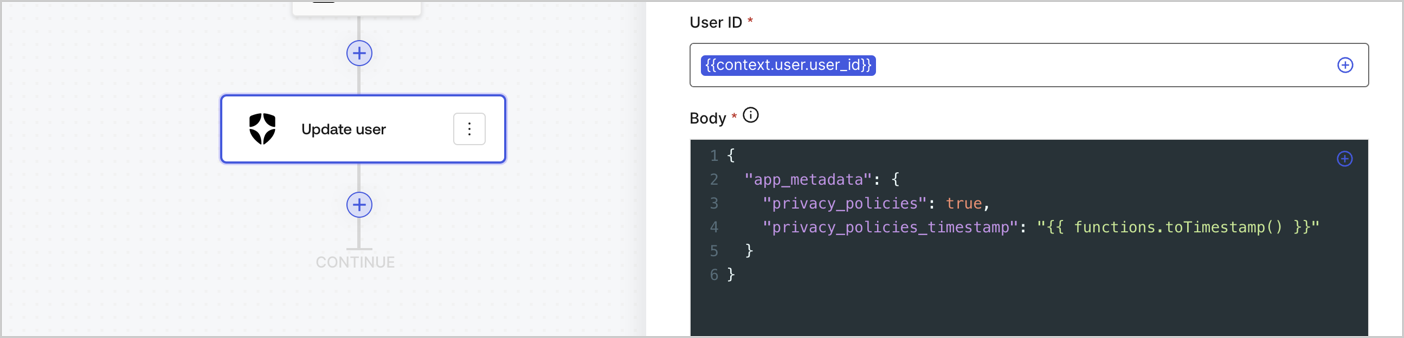
Add an Auth0 Update user action to the flow by following these steps:

1. Select the **Flow** **Update app\_metadata** > **Edit flow** to open the Flow editor in a new tab.
2. Below the StartAction, select the **+** icon to add an **Update user** action. Complete the fields below, then select **Save** to continue.

   * **Connection**: Select from the dropdown the Vault connection to your M2M application.

   * **User ID**: Enter `{{context.user.user_id}}`.

   * **Body**: Copy and paste the following code to update the app\_metadata with the privacy\_policies and privacy\_policies\_timestamp properties.

     ```text lines theme={null}
     {
       "app_metadata": {
         "privacy_policies": true,
         "privacy_policies_timestamp": "{{ functions.toTimestamp() }}"
       }
     }
     ```

   * Select **Save**.
3. Select **Publish** to save.
<Frame>
  <img src="https://mintcdn.com/generaltranslationinc/PZqXjqHIg9BH1QX1/docs/images/cdy7uua7fh8z/CvMNIwWrOUwaFW4X3G28p/1fb70ae57a20749d9ffaaba8dc0b7e26/update-user-privacy.png?fit=max&auto=format&n=PZqXjqHIg9BH1QX1&q=85&s=855fbd01615610dd2a8e9492c4ee7ea5" alt="Dashboard > Actions > Forms > User case privacy policy code" data-og-width="1404" width="1404" data-og-height="338" height="338" data-path="docs/images/cdy7uua7fh8z/CvMNIwWrOUwaFW4X3G28p/1fb70ae57a20749d9ffaaba8dc0b7e26/update-user-privacy.png" data-optimize="true" data-opv="3" srcset="https://mintcdn.com/generaltranslationinc/PZqXjqHIg9BH1QX1/docs/images/cdy7uua7fh8z/CvMNIwWrOUwaFW4X3G28p/1fb70ae57a20749d9ffaaba8dc0b7e26/update-user-privacy.png?w=280&fit=max&auto=format&n=PZqXjqHIg9BH1QX1&q=85&s=5f975c0a93d5f9694b5cfb4ae716a312 280w, https://mintcdn.com/generaltranslationinc/PZqXjqHIg9BH1QX1/docs/images/cdy7uua7fh8z/CvMNIwWrOUwaFW4X3G28p/1fb70ae57a20749d9ffaaba8dc0b7e26/update-user-privacy.png?w=560&fit=max&auto=format&n=PZqXjqHIg9BH1QX1&q=85&s=e584925fc96ae2eba5160f11f07555f2 560w, https://mintcdn.com/generaltranslationinc/PZqXjqHIg9BH1QX1/docs/images/cdy7uua7fh8z/CvMNIwWrOUwaFW4X3G28p/1fb70ae57a20749d9ffaaba8dc0b7e26/update-user-privacy.png?w=840&fit=max&auto=format&n=PZqXjqHIg9BH1QX1&q=85&s=2e1a3b94eeadbc0a28851b8896e71547 840w, https://mintcdn.com/generaltranslationinc/PZqXjqHIg9BH1QX1/docs/images/cdy7uua7fh8z/CvMNIwWrOUwaFW4X3G28p/1fb70ae57a20749d9ffaaba8dc0b7e26/update-user-privacy.png?w=1100&fit=max&auto=format&n=PZqXjqHIg9BH1QX1&q=85&s=ce2405b2567a28a8bc1f10d4f1633f9b 1100w, https://mintcdn.com/generaltranslationinc/PZqXjqHIg9BH1QX1/docs/images/cdy7uua7fh8z/CvMNIwWrOUwaFW4X3G28p/1fb70ae57a20749d9ffaaba8dc0b7e26/update-user-privacy.png?w=1650&fit=max&auto=format&n=PZqXjqHIg9BH1QX1&q=85&s=4e33ea9cc157d1d749bbf0038976b9fd 1650w, https://mintcdn.com/generaltranslationinc/PZqXjqHIg9BH1QX1/docs/images/cdy7uua7fh8z/CvMNIwWrOUwaFW4X3G28p/1fb70ae57a20749d9ffaaba8dc0b7e26/update-user-privacy.png?w=2500&fit=max&auto=format&n=PZqXjqHIg9BH1QX1&q=85&s=e8902917cdd61c27c025f80f8186580b 2500w" />
</Frame>

<Callout icon="file-lines" color="#0EA5E9" iconType="regular">
  The flow **Update app\_metadata** adds a `privacy_policies true` value to the app`_metadata` object and also generates a timestamp with a [helper function.](/docs/customize/forms/variables)
</Callout>

## Retrieve the form render code

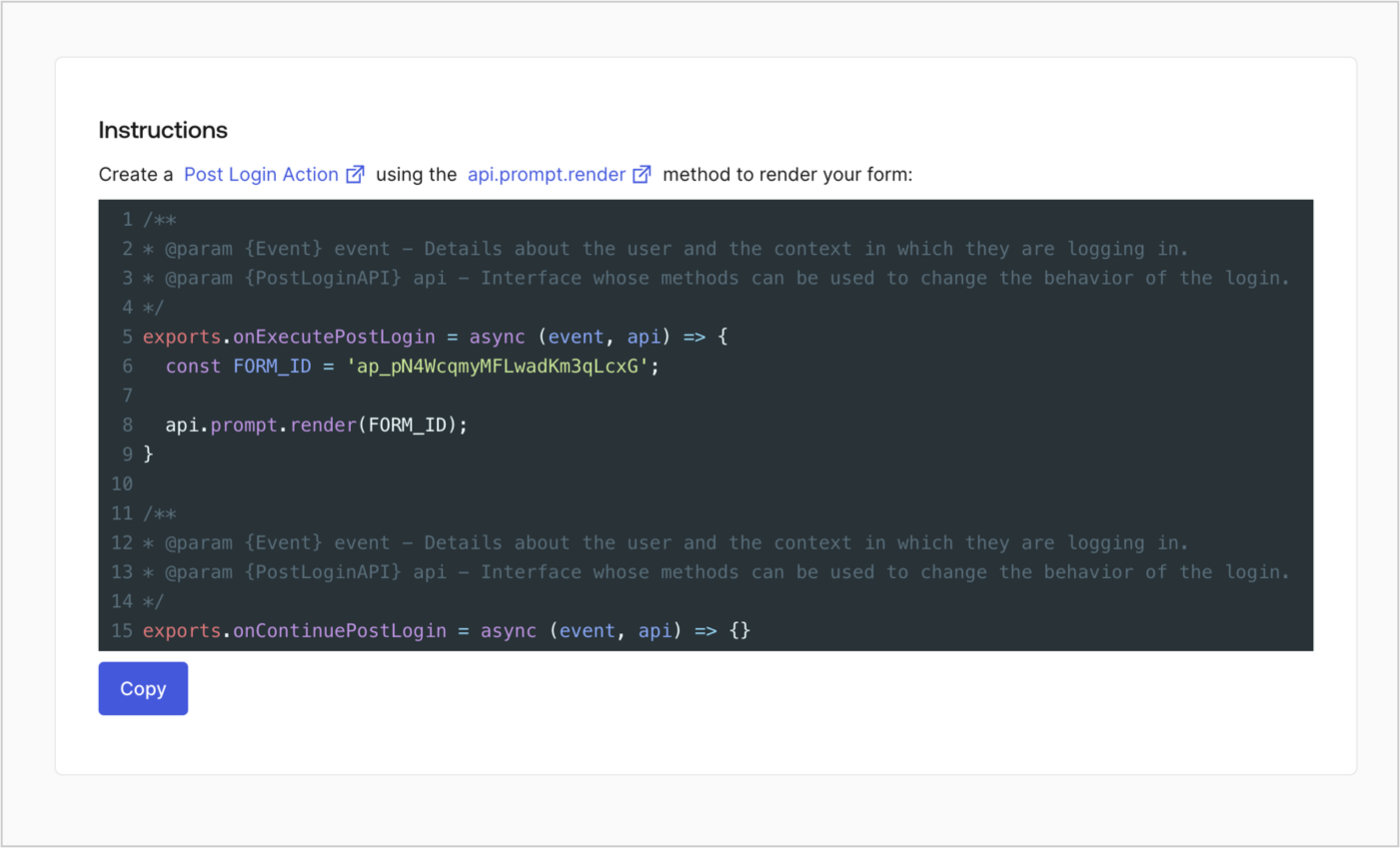
Retrieve your form render code to visually render the form with a custom Post Login Action by following these steps:

* From the Form editor, select **`<> Render`**.
* Select **Copy**.
<Frame>
  <img src="https://mintcdn.com/generaltranslationinc/-mZh6I5893vkj3e3/docs/images/cdy7uua7fh8z/2EIUzc539sq9lwoTKbjoJv/496a864c0fc44a782c9cadca119dbfb0/embed.png?fit=max&auto=format&n=-mZh6I5893vkj3e3&q=85&s=736550464faff507ec2c5dbbae4cd632" alt="Dashboard > Actions > Forms > Form > Embed" data-og-width="1400" width="1400" data-og-height="848" height="848" data-path="docs/images/cdy7uua7fh8z/2EIUzc539sq9lwoTKbjoJv/496a864c0fc44a782c9cadca119dbfb0/embed.png" data-optimize="true" data-opv="3" srcset="https://mintcdn.com/generaltranslationinc/-mZh6I5893vkj3e3/docs/images/cdy7uua7fh8z/2EIUzc539sq9lwoTKbjoJv/496a864c0fc44a782c9cadca119dbfb0/embed.png?w=280&fit=max&auto=format&n=-mZh6I5893vkj3e3&q=85&s=1f900cdd280478ea9fe3f1d799768d9f 280w, https://mintcdn.com/generaltranslationinc/-mZh6I5893vkj3e3/docs/images/cdy7uua7fh8z/2EIUzc539sq9lwoTKbjoJv/496a864c0fc44a782c9cadca119dbfb0/embed.png?w=560&fit=max&auto=format&n=-mZh6I5893vkj3e3&q=85&s=cdb64138a74e0d1b947440cea741ad21 560w, https://mintcdn.com/generaltranslationinc/-mZh6I5893vkj3e3/docs/images/cdy7uua7fh8z/2EIUzc539sq9lwoTKbjoJv/496a864c0fc44a782c9cadca119dbfb0/embed.png?w=840&fit=max&auto=format&n=-mZh6I5893vkj3e3&q=85&s=a43aebc6d5ec2ac2108e0435e29013c2 840w, https://mintcdn.com/generaltranslationinc/-mZh6I5893vkj3e3/docs/images/cdy7uua7fh8z/2EIUzc539sq9lwoTKbjoJv/496a864c0fc44a782c9cadca119dbfb0/embed.png?w=1100&fit=max&auto=format&n=-mZh6I5893vkj3e3&q=85&s=fdb8627abebdf3486e1c30bd2cb72aa0 1100w, https://mintcdn.com/generaltranslationinc/-mZh6I5893vkj3e3/docs/images/cdy7uua7fh8z/2EIUzc539sq9lwoTKbjoJv/496a864c0fc44a782c9cadca119dbfb0/embed.png?w=1650&fit=max&auto=format&n=-mZh6I5893vkj3e3&q=85&s=c7aa7004794da9bd4f4bcc4ddb8995d7 1650w, https://mintcdn.com/generaltranslationinc/-mZh6I5893vkj3e3/docs/images/cdy7uua7fh8z/2EIUzc539sq9lwoTKbjoJv/496a864c0fc44a782c9cadca119dbfb0/embed.png?w=2500&fit=max&auto=format&n=-mZh6I5893vkj3e3&q=85&s=a82599d8a0c429a895ca4ba68a42416c 2500w" />
</Frame>

## Create a Post Login Action

Create a post-login Action to render your form by following these steps:

1. Navigate to **Auth0 Dashboard > Actions > Flows > Login.**
2. Select the **+** icon and Select **Build from scratch**:

   * **Name**: Enter `Render Update Policy Form`.
   * **Trigger**: Select `Login / Post Login`.
   * **Runtime**: Select the recommended version.
3. Select **Create**.

To configure the post-login Action:

1. Delete the existing code from the Code editor.
2. Paste the form render code into the Code editor.
3. Edit the code to define the conditional logic that will render the form.

   ```javascript lines theme={null}
   /**
   * @param {Event} event - Details about the user and the context in which they are logging in.
   * @param {PostLoginAPI} api - Interface whose methods can be used to change the behavior of the login.
   */
   exports.onExecutePostLogin = async (event, api) => {
     const FORM_ID = 'REPLACE_WITH_YOUR_FORM_ID';

     if (event.user.app_metadata.privacy_policies !== true) {
       api.prompt.render(FORM_ID);
     }
   }

   exports.onContinuePostLogin = async (event, api) => { }
   ```

   <Callout icon="file-lines" color="#0EA5E9" iconType="regular">
     The example code above will render the form when a user is missing the app metadata `privacy_policies` property.
   </Callout>
4. Select **Deploy.**
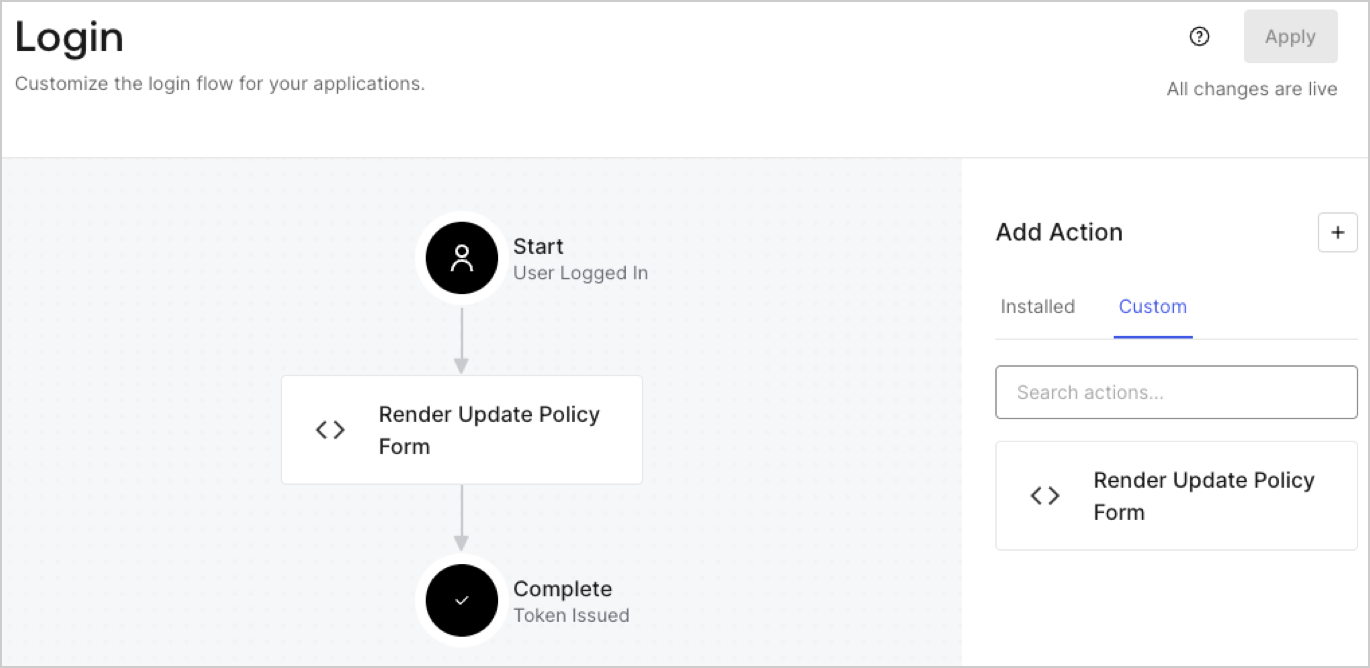
5. Drag and Drop the **Render Update Policy Form** Action to the **Login** flow.
   <Frame>
     <img src="https://mintcdn.com/generaltranslationinc/zzYYN5BbwWVQSB2A/docs/images/cdy7uua7fh8z/5TOwDgevZsBqd7yZynUYWU/41ca909dc3007aed4f40ff794a05efa5/postlogin.png?fit=max&auto=format&n=zzYYN5BbwWVQSB2A&q=85&s=991e31b92bf8e7acdba6d10d611f398c" alt="Dashboard > Forms > Use Case > Render update policy form login action" data-og-width="1370" width="1370" data-og-height="668" height="668" data-path="docs/images/cdy7uua7fh8z/5TOwDgevZsBqd7yZynUYWU/41ca909dc3007aed4f40ff794a05efa5/postlogin.png" data-optimize="true" data-opv="3" srcset="https://mintcdn.com/generaltranslationinc/zzYYN5BbwWVQSB2A/docs/images/cdy7uua7fh8z/5TOwDgevZsBqd7yZynUYWU/41ca909dc3007aed4f40ff794a05efa5/postlogin.png?w=280&fit=max&auto=format&n=zzYYN5BbwWVQSB2A&q=85&s=994d14e1667ba87bed5857f7bb7c6e13 280w, https://mintcdn.com/generaltranslationinc/zzYYN5BbwWVQSB2A/docs/images/cdy7uua7fh8z/5TOwDgevZsBqd7yZynUYWU/41ca909dc3007aed4f40ff794a05efa5/postlogin.png?w=560&fit=max&auto=format&n=zzYYN5BbwWVQSB2A&q=85&s=0f48281a534e433aaf7d4827e45b6059 560w, https://mintcdn.com/generaltranslationinc/zzYYN5BbwWVQSB2A/docs/images/cdy7uua7fh8z/5TOwDgevZsBqd7yZynUYWU/41ca909dc3007aed4f40ff794a05efa5/postlogin.png?w=840&fit=max&auto=format&n=zzYYN5BbwWVQSB2A&q=85&s=e229edce4d38da299c38ab913655f0f6 840w, https://mintcdn.com/generaltranslationinc/zzYYN5BbwWVQSB2A/docs/images/cdy7uua7fh8z/5TOwDgevZsBqd7yZynUYWU/41ca909dc3007aed4f40ff794a05efa5/postlogin.png?w=1100&fit=max&auto=format&n=zzYYN5BbwWVQSB2A&q=85&s=a6637eb911b691d5801102ed0908a2fa 1100w, https://mintcdn.com/generaltranslationinc/zzYYN5BbwWVQSB2A/docs/images/cdy7uua7fh8z/5TOwDgevZsBqd7yZynUYWU/41ca909dc3007aed4f40ff794a05efa5/postlogin.png?w=1650&fit=max&auto=format&n=zzYYN5BbwWVQSB2A&q=85&s=f9e613300caf610697ea32da581e6877 1650w, https://mintcdn.com/generaltranslationinc/zzYYN5BbwWVQSB2A/docs/images/cdy7uua7fh8z/5TOwDgevZsBqd7yZynUYWU/41ca909dc3007aed4f40ff794a05efa5/postlogin.png?w=2500&fit=max&auto=format&n=zzYYN5BbwWVQSB2A&q=85&s=be38edc97fc4a74884574435f570f131 2500w" />
   </Frame>
6. Select **Apply.**

### Test implementation

Test the implementation by following these steps:

1. Log in with an existing user whose app`_metadata` attribute `privacy_policies` does not have a value.
2. The post-login Action in the Login flow will render the form and prompt for acceptance.
3. Select **Auth0 Dashboard > User Management > Users,** locate the user and verify that the `app_metadata` attribute `privacy_policies` contains a `true` value and a timestamp.
