> ## Documentation Index
> Fetch the complete documentation index at: https://auth0.generaltranslation.app/llms.txt
> Use this file to discover all available pages before exploring further.

> Learn how to promote a connection to domain level using the Auth0 Dashboard or Auth0 Management API.

# Promote Connections to Domain Level

export const AuthCodeGroup = ({children, dropdown}) => {
  const [processedChildren, setProcessedChildren] = useState(children);
  useEffect(() => {
    let unsubscribe = null;
    function init() {
      unsubscribe = window.autorun(() => {
        const processChildren = node => {
          if (typeof node === "string") {
            let processedNode = node;
            for (const [key, value] of window.rootStore.variableStore.values.entries()) {
              processedNode = processedNode.replace(new RegExp(key, "g"), value);
            }
            return processedNode;
          } else if (Array.isArray(node)) {
            return node.map(processChildren);
          } else if (node && node.props && node.props.children) {
            return {
              ...node,
              props: {
                ...node.props,
                children: processChildren(node.props.children)
              }
            };
          }
          return node;
        };
        setProcessedChildren(processChildren(children));
      });
    }
    if (window.rootStore) {
      init();
    } else {
      window.addEventListener("adu:storeReady", init);
    }
    return () => {
      window.removeEventListener("adu:storeReady", init);
      unsubscribe?.();
    };
  }, [children]);
  return <CodeGroup dropdown={dropdown}>{processedChildren}</CodeGroup>;
};

export const AuthCodeBlock = ({filename, icon, language, highlight, children}) => {
  const [processedChildren, setProcessedChildren] = useState(children);
  useEffect(() => {
    let unsubscribe = null;
    function init() {
      unsubscribe = window.autorun(() => {
        let processedChildren = children;
        for (const [key, value] of window.rootStore.variableStore.values.entries()) {
          processedChildren = processedChildren.replace(new RegExp(key, "g"), value);
        }
        setProcessedChildren(processedChildren);
      });
    }
    if (window.rootStore) {
      init();
    } else {
      window.addEventListener("adu:storeReady", init);
    }
    return () => {
      window.removeEventListener("adu:storeReady", init);
      unsubscribe?.();
    };
  }, [children]);
  return <CodeBlock filename={filename} icon={icon} language={language} lines highlight={highlight}>
      {processedChildren}
    </CodeBlock>;
};

If your tenant has [Dynamic Client Registration](/docs/get-started/applications/dynamic-client-registration) enabled, you can let [third party applications](/docs/get-started/applications/confidential-and-public-applications/enable-third-party-applications) use a connection by promoting it to a domain-level connection. Domain level connections are enabled or disabled for all applications in a tenant.

You can promote a connection using the <Tooltip tip="Auth0 Dashboard: Auth0's main product to configure your services." cta="View Glossary" href="/docs/glossary?term=Auth0+Dashboard">Auth0 Dashboard</Tooltip> or the <Tooltip tip="Management API: A product to allow customers to perform administrative tasks." cta="View Glossary" href="/docs/glossary?term=Management+API">Management API</Tooltip>.

<Tabs>
  <Tab title="Auth0 Dashboard">
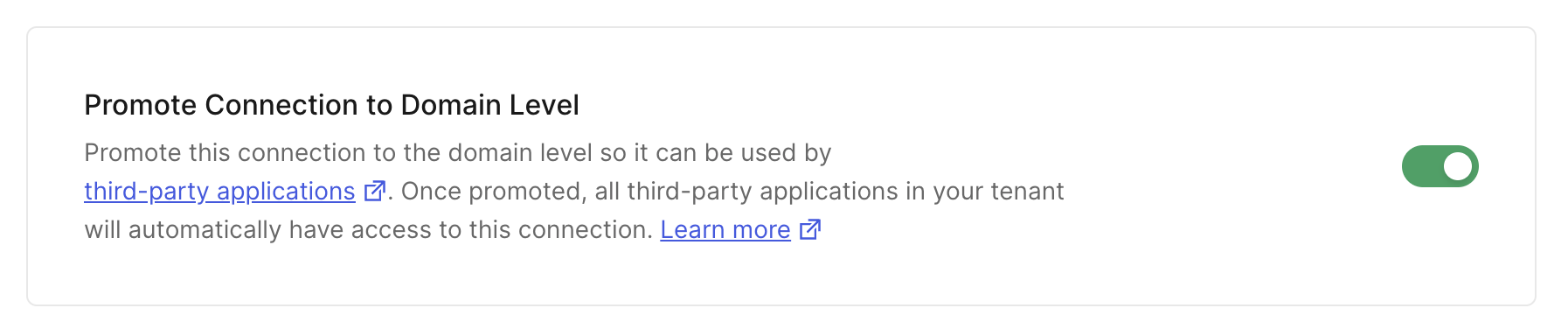
    You can promote a connection to the domain level directly from the Auth0 Dashboard. This option is available for all connection types (Database, Social, Enterprise, and Passwordless).

    1. Navigate to **Dashboard > Authentication** and select the connection type (e.g., **Database, Social, Enterprise**).
    2. Create a new connection or select an existing one to configure.
    3. Go to the **Settings** tab.
    4. Scroll down to find the **Promote Connection to Domain Level** setting, which is typically in the **Advanced** section.
    5. Enable the toggle switch.

    <Frame>
      <img src="https://mintcdn.com/generaltranslationinc/md6b8ua1hdYa2pM7/docs/images/cdy7uua7fh8z/promote-connection-to-domain-level.png?fit=max&auto=format&n=md6b8ua1hdYa2pM7&q=85&s=27525121e1e6106b7582f883299bafd9" alt="Promote Connection to Domain Level" width="1794" height="384" data-path="docs/images/cdy7uua7fh8z/promote-connection-to-domain-level.png" />
    </Frame>

    6. Click **Save Changes**.
  </Tab>

  <Tab title="Management API">
    Alternatively, you can promote a connection using a `PATCH` call to the [Update a Connection endpoint](https://auth0.com/docs/api/management/v2#!/Connections/patch_connections_by_id) of the Management API. Be sure to replace the `CONNECTION_ID` and `MGMT_API_ACCESS_TOKEN` placeholder values with your specific information.

    <AuthCodeGroup>
      ```bash cURL theme={null}
      curl --request PATCH \
        --url 'https://{yourDomain}/api/v2/connections/CONNECTION_ID' \
        --header 'authorization: Bearer MGMT_API_ACCESS_TOKEN' \
        --header 'cache-control: no-cache' \
        --header 'content-type: application/json' \
        --data '{ "is_domain_connection": true }'
      ```

      ```csharp C# theme={null}
      var client = new RestClient("https://{yourDomain}/api/v2/connections/CONNECTION_ID");
      var request = new RestRequest(Method.PATCH);
      request.AddHeader("content-type", "application/json");
      request.AddHeader("authorization", "Bearer MGMT_API_ACCESS_TOKEN");
      request.AddHeader("cache-control", "no-cache");
      request.AddParameter("application/json", "{ "is_domain_connection": true }", ParameterType.RequestBody);
      IRestResponse response = client.Execute(request);
      ```

      ```go Go theme={null}
      package main

      import (
        "fmt"
        "strings"
        "net/http"
        "io/ioutil"
      )

      func main() {

        url := "https://{yourDomain}/api/v2/connections/CONNECTION_ID"

        payload := strings.NewReader("{ "is_domain_connection": true }")

        req, _ := http.NewRequest("PATCH", url, payload)

        req.Header.Add("content-type", "application/json")
        req.Header.Add("authorization", "Bearer MGMT_API_ACCESS_TOKEN")
        req.Header.Add("cache-control", "no-cache")

        res, _ := http.DefaultClient.Do(req)

        defer res.Body.Close()
        body, _ := ioutil.ReadAll(res.Body)

        fmt.Println(res)
        fmt.Println(string(body))

      }
      ```

      ```java Java theme={null}
      HttpResponse<String> response = Unirest.patch("https://{yourDomain}/api/v2/connections/CONNECTION_ID")
        .header("content-type", "application/json")
        .header("authorization", "Bearer MGMT_API_ACCESS_TOKEN")
        .header("cache-control", "no-cache")
        .body("{ "is_domain_connection": true }")
        .asString();
      ```

      ```javascript Node.JS theme={null}
      var axios = require("axios").default;

      var options = {
        method: 'PATCH',
        url: 'https://{yourDomain}/api/v2/connections/CONNECTION_ID',
        headers: {
          'content-type': 'application/json',
          authorization: 'Bearer MGMT_API_ACCESS_TOKEN',
          'cache-control': 'no-cache'
        },
        data: {is_domain_connection: true}
      };

      axios.request(options).then(function (response) {
        console.log(response.data);
      }).catch(function (error) {
        console.error(error);
      });
      ```

      ```objc Obj-C theme={null}
      #import <Foundation/Foundation.h>

      NSDictionary *headers = @{ @"content-type": @"application/json",
                                 @"authorization": @"Bearer MGMT_API_ACCESS_TOKEN",
                                 @"cache-control": @"no-cache" };
      NSDictionary *parameters = @{ @"is_domain_connection": @YES };

      NSData *postData = [NSJSONSerialization dataWithJSONObject:parameters options:0 error:nil];

      NSMutableURLRequest *request = [NSMutableURLRequest requestWithURL:[NSURL URLWithString:@"https://{yourDomain}/api/v2/connections/CONNECTION_ID"]
                                                             cachePolicy:NSURLRequestUseProtocolCachePolicy
                                                         timeoutInterval:10.0];
      [request setHTTPMethod:@"PATCH"];
      [request setAllHTTPHeaderFields:headers];
      [request setHTTPBody:postData];

      NSURLSession *session = [NSURLSession sharedSession];
      NSURLSessionDataTask *dataTask = [session dataTaskWithRequest:request
                                                  completionHandler:^(NSData *data, NSURLResponse *response, NSError *error) {
                                                      if (error) {
                                                          NSLog(@"%@", error);
                                                      } else {
                                                          NSHTTPURLResponse *httpResponse = (NSHTTPURLResponse *) response;
                                                          NSLog(@"%@", httpResponse);
                                                      }
                                                  }];
      [dataTask resume];
      ```

      ```php PHP theme={null}
      $curl = curl_init();

      curl_setopt_array($curl, [
        CURLOPT_URL => "https://{yourDomain}/api/v2/connections/CONNECTION_ID",
        CURLOPT_RETURNTRANSFER => true,
        CURLOPT_ENCODING => "",
        CURLOPT_MAXREDIRS => 10,
        CURLOPT_TIMEOUT => 30,
        CURLOPT_HTTP_VERSION => CURL_HTTP_VERSION_1_1,
        CURLOPT_CUSTOMREQUEST => "PATCH",
        CURLOPT_POSTFIELDS => "{ "is_domain_connection": true }",
        CURLOPT_HTTPHEADER => [
          "authorization: Bearer MGMT_API_ACCESS_TOKEN",
          "cache-control: no-cache",
          "content-type: application/json"
        ],
      ]);

      $response = curl_exec($curl);
      $err = curl_error($curl);

      curl_close($curl);

      if ($err) {
        echo "cURL Error #:" . $err;
      } else {
        echo $response;
      }
      ```

      ```python Python theme={null}
      import http.client

      conn = http.client.HTTPSConnection("")

      payload = "{ "is_domain_connection": true }"

      headers = {
          'content-type': "application/json",
          'authorization': "Bearer MGMT_API_ACCESS_TOKEN",
          'cache-control': "no-cache"
          }

      conn.request("PATCH", "/{yourDomain}/api/v2/connections/CONNECTION_ID", payload, headers)

      res = conn.getresponse()
      data = res.read()

      print(data.decode("utf-8"))
      ```

      ```ruby Ruby theme={null}
      require 'uri'
      require 'net/http'
      require 'openssl'

      url = URI("https://{yourDomain}/api/v2/connections/CONNECTION_ID")

      http = Net::HTTP.new(url.host, url.port)
      http.use_ssl = true
      http.verify_mode = OpenSSL::SSL::VERIFY_NONE

      request = Net::HTTP::Patch.new(url)
      request["content-type"] = 'application/json'
      request["authorization"] = 'Bearer MGMT_API_ACCESS_TOKEN'
      request["cache-control"] = 'no-cache'
      request.body = "{ "is_domain_connection": true }"

      response = http.request(request)
      puts response.read_body
      ```

      ```swift Swift theme={null}
      import Foundation

      let headers = [
        "content-type": "application/json",
        "authorization": "Bearer MGMT_API_ACCESS_TOKEN",
        "cache-control": "no-cache"
      ]
      let parameters = ["is_domain_connection": true] as [String : Any]

      let postData = JSONSerialization.data(withJSONObject: parameters, options: [])

      let request = NSMutableURLRequest(url: NSURL(string: "https://{yourDomain}/api/v2/connections/CONNECTION_ID")! as URL,
                                              cachePolicy: .useProtocolCachePolicy,
                                          timeoutInterval: 10.0)
      request.httpMethod = "PATCH"
      request.allHTTPHeaderFields = headers
      request.httpBody = postData as Data

      let session = URLSession.shared
      let dataTask = session.dataTask(with: request as URLRequest, completionHandler: { (data, response, error) -> Void in
        if (error != nil) {
          print(error)
        } else {
          let httpResponse = response as? HTTPURLResponse
          print(httpResponse)
        }
      })

      dataTask.resume()
      ```
    </AuthCodeGroup>

    <table class="table">
      <thead>
        <tr>
          <th>Value</th>
          <th>Description</th>
        </tr>
      </thead>

      <tbody>
        <tr>
          <td><code>CONNECTION\_ID</code></td>
          <td>Τhe ID of the connection to be promoted.</td>
        </tr>

        <tr>
          <td><code>MGMT\_API\_ACCESS\_TOKEN</code></td>
          <td><a href="https://auth0.com/docs/api/management/v2/tokens">Access Token for the Management API</a> with the <Tooltip tip="Mechanism that determines actions applications can perform on a user's behalf with information previously created in an online resource." cta="View Glossary" href="/docs/glossary?term=scope">scope</Tooltip> <code>update:connections</code>.</td>
        </tr>
      </tbody>
    </table>
  </Tab>
</Tabs>
